

Plan and billing
See the current plan and its state, follow this period's usage, read past invoices and compare the plans in the catalogue.
On this page
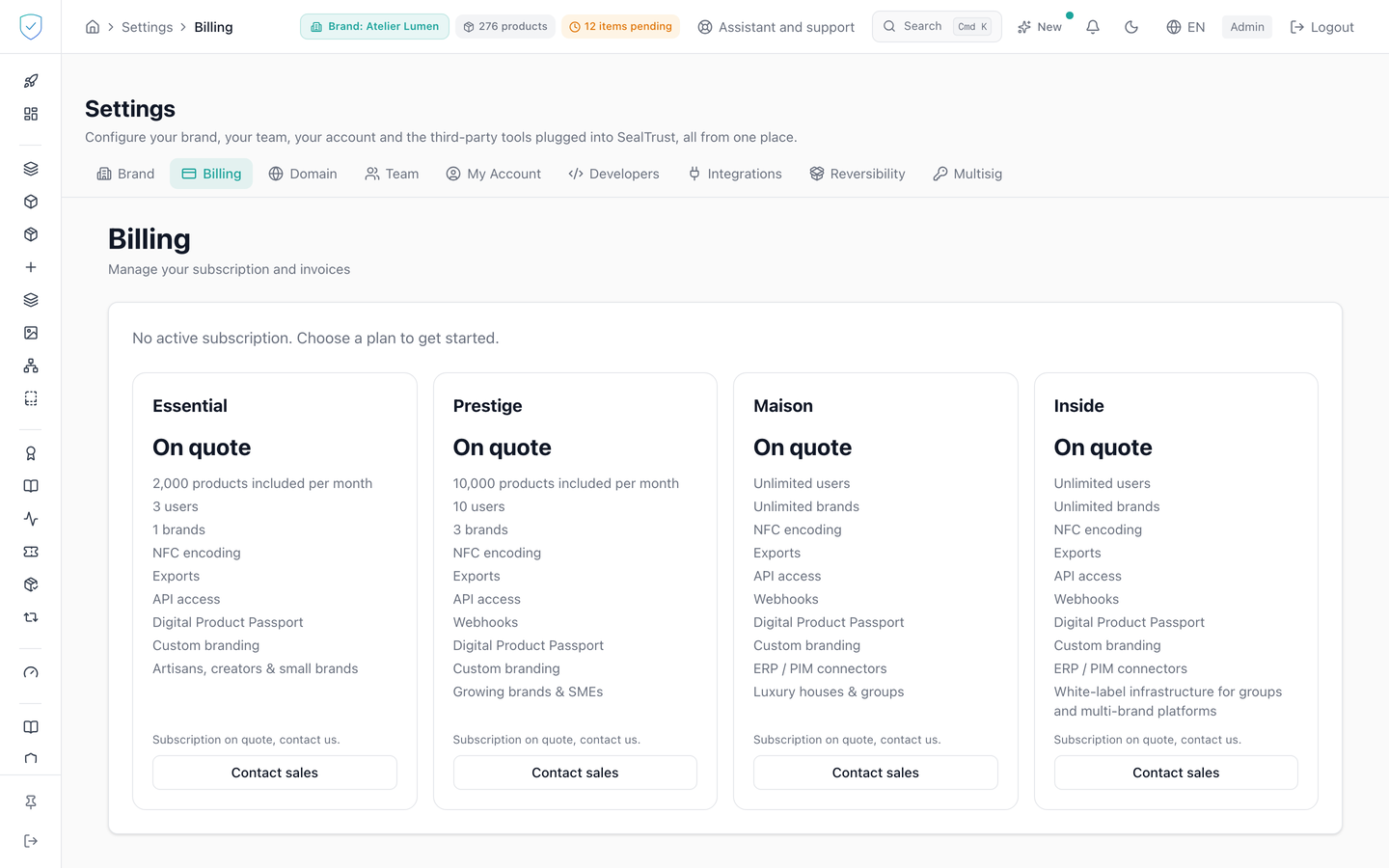
This is the brand's financial view: the plan it holds, its state, usage for the current period and the invoice history. The plan grid comes from the catalogue held in the database. No price is hard-coded into the screen, which is why a plan can appear with no price at all.
#What the screen shows
- On opening, the billing state and the last 20 invoices, from the most recent to the oldest.
- With no online subscription, the plan grid in place of the subscription cards. Above it, a brand whose plan is set under contract, on quote, reads "Your plan: Prestige, on quote, under your contract" (with the name of its plan), and that plan is marked as the current plan in the grid. Every brand opened by a reseller is in that case. A brand with no plan reads that it has no active subscription.
- A usage card with 4 counters: "Pieces created", "Tokens created", "API calls" and "Scans (verified chip + QR opens)". "Pieces created" counts the pieces created over the period, NFC chip or QR, without the destroyed ones. The period is that of the online subscription when there is one, otherwise the current calendar month. The scans counter adds the NFC chip reads our server verified and the openings of a product page by QR code. What a phone reports about itself and failed verifications are left out. This counter shows your consumption and bills nothing. The resellers' usage statement shows these two figures apart and bills no scan.
- The plan grid: price, quotas and included entitlements, read from what the catalogue returns. For every plan sold, the card gives the pieces included per year, then priced per piece, not a monthly volume. Each plan's tagline is shown in the console's language.
- On the Compliance offer, a card says so at the top: the brand is billed by the number of its passports (products online during the year, lots created), and the amounts are those of the contract. The grid then counts no piece and does not announce NFC encoding, and the dashboard's "My plan" card shows no product or certificate counter.
- A plan with no price in the database is shown as quote-based. It shows neither a zero nor a dash.
- On the yearly cycle, the price is a monthly equivalent, labelled as billed yearly.
- The tile of the plan you already hold shows a disabled button naming it as your current plan.
#A brand's billing page, for a superadmin
From the subscriptions list, "View" opens /billing/{id}, the page of one brand. The "Plan" card says:
- the plan, with "Reseller" under its name when the brand itself sells to client brands;
- the offer: "Compliance" or "Compliance + Identity";
- the status, which says how the brand is billed: the state of its online subscription when it has one, "Under contract" for a plan sold on quote, "Under contract with" and the reseller's name for a brand a reseller opened, "No subscription" for a brand with no plan or on trial;
- the "Billing cycle": monthly or annual for an online subscription, "Per the contract" for a brand under contract;
- the end of the current period.
Invoice amounts are written in the console's language: decimal point and symbol before the number in English.
#What you can do here
- Switch between the monthly and the yearly cycle, and unfold the grid to compare.
- Open the payment portal in a new tab.
- Cancel the subscription, after confirmation, or reactivate a subscription whose end was scheduled.
- Open an invoice online or download its PDF.
- Write to the sales team about a quote-based plan.
#What controls access
- The grid only shows plans still in the catalogue, plus the one you already hold even if it was withdrawn from it. Trial plans do not appear.
- The online subscription button only appears if the plan is sold self-service and a price exists for the chosen cycle. Otherwise the tile switches to a contact button.
- The monthly or yearly switch is only shown if at least one plan carries a price.
- The yearly discount is only shown if every priced plan discounts by the same rounded percentage.
- Cancelling cuts nothing off straight away. It schedules the end for the end of the current period.
- An account that reaches several brands has to name the brand it means. The server does not pick one for you.
#What the screen refuses
- Online subscription is closed by default. The server answers that plans are sold on quote and points to the sales team, before any call to the payment provider.
- A plan sold by the sales team does not go through online checkout.
- A brand that already has an active, trialing or past due subscription cannot open a second one. The server points to the payment portal.
- Opening the portal with no billing account is refused: "No billing account found. Please subscribe first."
- Cancelling with no active subscription, or reactivating with no scheduled end, is refused.
- If the catalogue cannot be read, the grid gives way to an explanation and a contact button. No stand-in figures are shown.
Was this page helpful?
Your answer opens a pre-filled email in your mail app, addressed to contact@sealtrust.io. You read it over before sending it.