

Wipe a tag
Clean up a chip that has been encoded: detach its product row, erase the written address, erase the certificate and reset the keys to factory.
This is the screen that undoes what the encoder did, at /wipe-nfc. You tick the cleanup levels you want, you place the chip on the reader, and the screen runs them in a fixed order. Each level returns its own result.
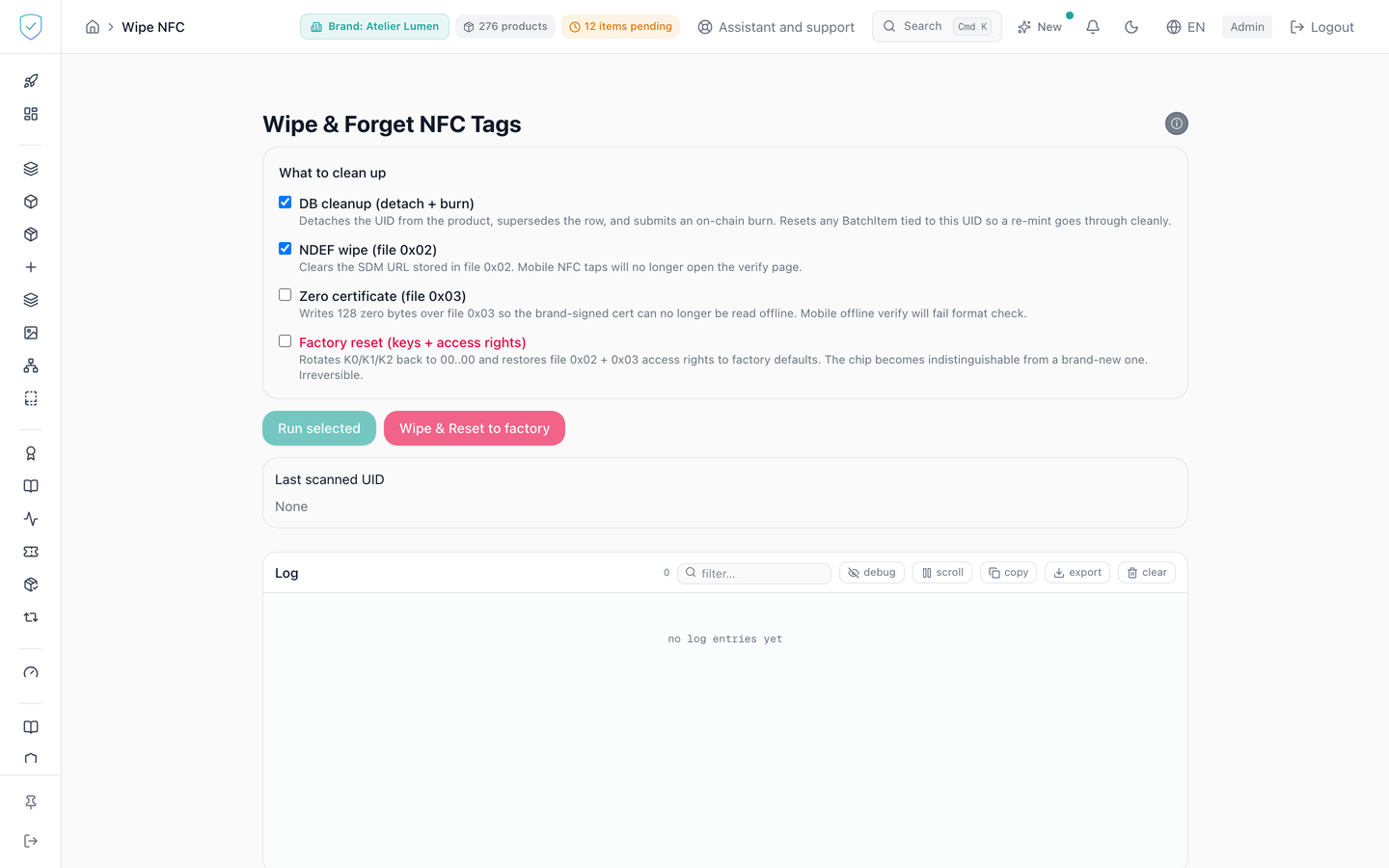
#What the screen shows
Four checkboxes under the "What to clean up" heading: "DB cleanup (detach + burn)", "NDEF wipe (file 0x02)", "Zero certificate (file 0x03)" and, in red, "Factory reset (keys + access rights)". The first two are ticked on opening, the two destructive ones are not.
At the end of the run, a summary lists the steps launched, each with a tick or a cross. Only the database cleanup step gives the reason for its failure, in brackets. The other three carry a bare cross.
#What you can do here
- "Run selected" runs the ticked levels in this order: database, written address, certificate, keys.
- The database cleanup asks for the product's token to be destroyed on chain and detaches the chip from its product row. The row loses its
uid_hash, itstag_certificateand itsowner_email, and moves to statussuperseded. The row search only looks at units still in the catalogue. - "Wipe & Reset to factory" ticks all four levels at once, then opens the factory reset confirmation window.
- In that window, you must type RESET to unlock the button.
- The database cleanup pauses to have you retype the product serial, or its token id when the row carries none, and enter a two-factor code, with a checkbox for a backup code.
#What governs access
This screen serves the identity of pieces. For a brand on the Compliance offer, its menu entry stays visible but locked, marked "Identity", and the server refuses its operations with the code OFFER_EXCLUDES_IDENTITY (the two offers). Opened from a saved link or a typed address, the screen shows "Included in the Compliance + Identity offer" inside the console, not a refusal about the plan.
The "Wipe tag" entry lives in the "Tools" section of the menu, carried by the nfc_encoding capability and locked, while staying visible, for the basic and dpp brand profiles.
Both run buttons stay inert as long as the reader is not connected or a cleanup is running. Ticking "Factory reset" also diverts "Run selected" to the confirmation window.
The two-factor code is never waived, including for a brand governed by a multi-signature vault. The value retyped in the browser only unlocks the button. The server checks it again and is the sole authority.
#What the screen refuses
- No box ticked: "Select at least one operation.", and nothing is sent.
- No reader: "WS not connected."
- If the chip matches several product rows carrying different serials, nothing is sent: the screen refuses to guess which one would be concerned.
- If no product row matches the chip, the request is refused and nothing is destroyed.
- A step whose reader does not answer within the allotted time interrupts the whole cleanup: the remaining steps are not launched and the closing summary is not shown. The timeouts are 15 seconds for the written address, 30 seconds for the certificate and 60 seconds for the factory reset.
Was this page helpful?
Your answer opens a pre-filled email in your mail app, addressed to contact@sealtrust.io. You read it over before sending it.