

The custom domain
Track the state of the domain your consumer pages are served under, read the DNS records to publish, and re-run the check.
On this page
This tab tracks the state of the domain your consumer pages are served under. You open it to read the DNS records to publish with your host, then to re-run the check once they are in place. Setting up, changing and suspending the domain go through SealTrust: here, you track and you check.
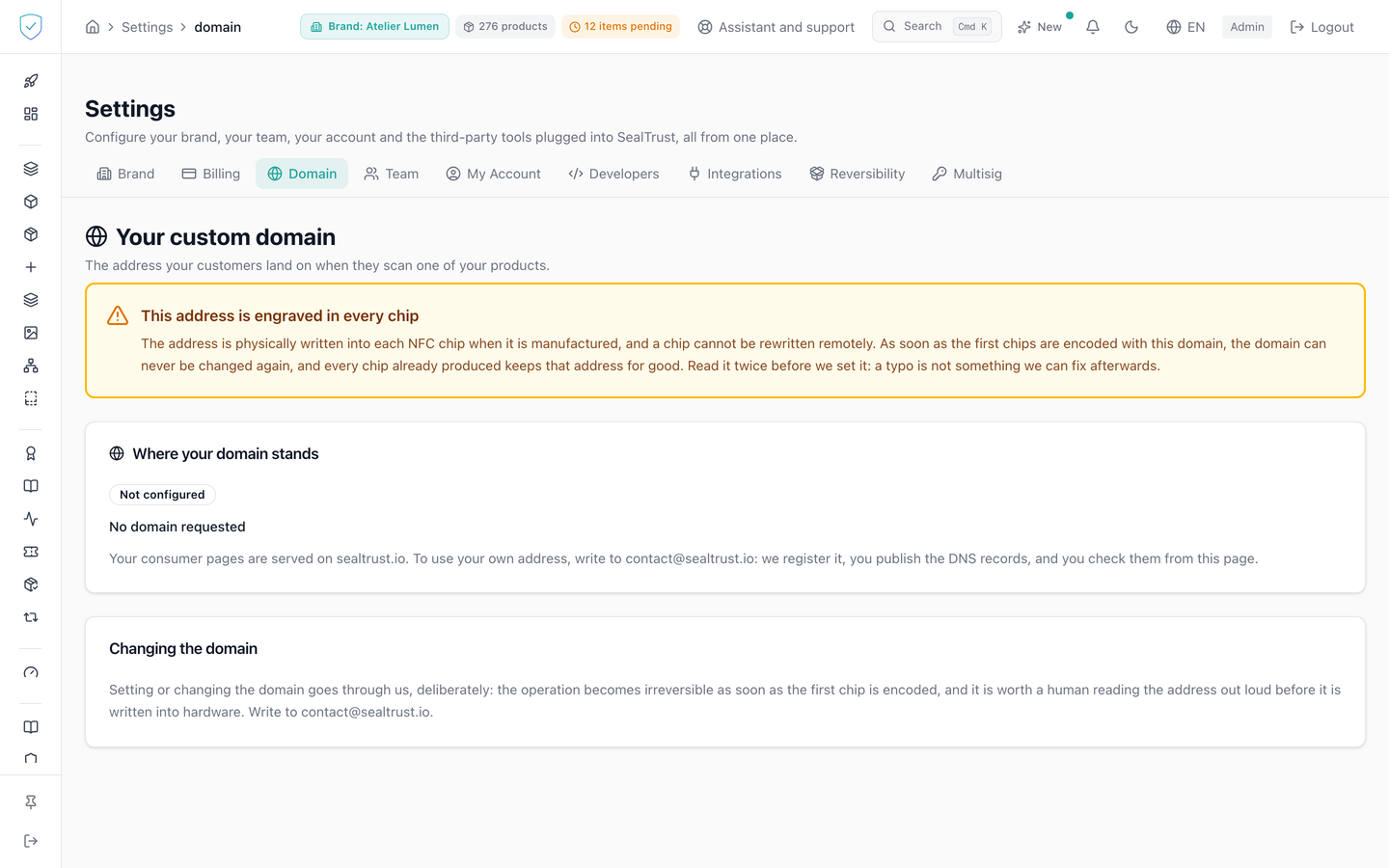
#What the screen shows
- A banner at the top of the page, before the state and before the records, headed "This address is engraved in every chip". It is present in every state. Once chips have been encoded, it turns red and becomes "This domain is now final".
- The domain in monospaced characters, and a state badge among "Not configured", "Waiting for DNS", "Verified" and "Suspended". A "Final" badge is added when the domain is locked.
- A "Where your domain stands" card, with a heading and a paragraph of its own for each of the four states.
- A "What you need to publish" card: a TXT record, name and value, then one address record per target address. Its type is
AAAAwhen the value contains a colon,Aotherwise. - A "Check the records" card, which recalls that a DNS change takes a few minutes to propagate, sometimes up to 24 hours.
- A "Changing the domain" card, stating that setting up and changing the domain go through SealTrust, deliberately.
- A brand selector, when the account is not locked to a single brand.
#What you can do here
- Copy a record value with "Copy", which shows "Copied" for 2 seconds.
- Re-run the check with "Run the check". While it runs, the button is disabled and reads "Checking".
- Read the reason a check failed, rewritten into something you can act on.
- Change the brand on display.
#What controls access
- The screen is reserved for the white-label option, included in the SealTrust Inside plan. Without that entitlement, the page shows a padlock. The entitlement covering your logo and colours is a separate one, and it is not enough.
- The server applies the same check when reading the state and when running the verification.
- The content only appears for an authenticated administrator session.
- The records card and the verification card only appear once a domain is assigned.
- The "Domain" tab stays visible for every profile, including those without the entitlement.
#What the screen refuses
- Plan without white label: "Custom domains are not included in your plan".
- Brand outside the account's scope:
Accès interdit à cette marque., the wording the server returns in French whatever the interface language. - Check re-run too soon: a request made less than 10 seconds after the previous one is refused with "A check was just run. Wait a few seconds before trying again."
- Check requested with no domain configured:
Aucun domaine personnalisé n'est configuré pour cette marque., another wording the server returns in French. - Target addresses missing: an alert message takes the place of the address record.
- Copy refused by the browser: "Unable to copy. Select the text and copy it manually."
- Load failure: "Unable to load the domain for this brand."
#What the verified domain covers
The domain answers at the latest 30 seconds after it turns "Verified". During that short delay, a page opened on this domain may still be refused: reload it. A suspended domain stops answering within the same delay. Only SealTrust restores it: running the check on a suspended domain answers "Ce domaine a été suspendu par SealTrust. Seul SealTrust peut le rétablir : contactez-nous." (a French server message, shown as is) and the domain stays suspended.
Once the domain is verified, it carries everything your end customer sees or scans:
- the public pages: certificate, product, passport, served under your domain with no mention of SealTrust, down to the browser tab title and the icon;
- your logo and your two colours on those pages, and on the proof and the history of a product, under the legibility conditions described in Settings, Brand;
- the canonical address declared to search engines, so your domain is the one indexed, not ours;
- the preview shown when one of your customers shares a link on WhatsApp, Facebook or by message;
- every QR code meant for printing: the per-item code, the verification code, the certificate code, the GS1 code on the packaging, batch-generated runs, and the code placed on the certificate PDF;
- the address burned into the NFC chip;
- the pass added to the phone's wallet;
- the styling of the emails sent to your customers: your name, your colours, and the links they contain.
#A printed code waits until the domain is final
A verified domain can still change. A printed code cannot. If a code carried your domain and the domain then changed, the label would lead nowhere.
That is why a code you can print carries your domain only once it is final (the "Final" badge):
- the QR code archive of a batch, on the batch page, asks you to retype your domain. That download makes it final, and the archive then carries your domain;
- the per-item code, the verification code, the certificate code, the code on the certificate PDF and the wallet card carry our address while your domain is not final. That address stays valid forever. Once your domain is final, they carry yours.
Encoding an NFC chip or signing a passport under your domain also makes it final.
#Your domain serves only your products
The address of a product that is not yours, requested on your domain, answers "not found". Neither the page, nor its browser tab title, nor its share preview, nor the raw data behind it: nothing from another brand leaves your domain.
In practice, someone who swaps the serial number in the address for that of another brand's product gets nothing. Your domain stays yours, including for whoever tries.
The rule covers everything your domain can serve, not only the pages:
- the passport, its integrity proof and its signed credential;
- the certificate of authenticity and its PDF;
- the product history, its warranty and its anchoring proof;
- QR codes and wallet cards (Apple Wallet, Google Wallet);
- a brand's public keys, identity document (DID) and branding;
- the sales capture links handed to your stores.
On your domain, the list of public keys holds yours only.
On our own domain nothing changes: it keeps serving every brand.
#Your own app, if you have one
If you have built your own app with our SDK, fill in its address: the public pages will then offer yours to your customers instead of ours.
- With no address filled in, we offer our app. It stays useful: reading an NFC chip offline requires an app, and your customers would otherwise have none.
- If you hide the "Powered by SealTrust" wording and have no app, the block disappears entirely.
- ⚠️ The address must use
httpsor be a deep link into your app. A plainhttpaddress is refused, as it is for your logo.
#The language served on your domain
Your public pages exist in French and in English. The language shown follows your visitor, in this order:
- the language written in the address, for example
/en/; - the one they picked on an earlier visit;
- the one their browser asks for.
One case is left: the visitor asked for nothing, or their browser asks for a language we do not serve, Swedish for instance. One language still has to be shown, and you are the one who says which one for your domain.
The setting is under Settings, Brand tab, Public language card. Pick a language, or leave the option empty to go back to the default behaviour.
- As long as you say nothing, your pages show English in that case.
- Your choice never overrides your visitor. Somebody whose browser asks for English is served English, whatever language you picked.
- The setting only applies on your domain. On ours, our own default language keeps applying.
- It also applies to a scan of a printed code, which lands on your domain.
[!NOTE] Why this setting matters before you print A leather label cannot be printed again. If you sell abroad, set the language before you run a batch, rather than after seeing where your customers land.
#What it does not cover
- The sender address of our emails. ⚠️ Once you delegate your sending subdomain, note that if our sending provider fails we will not send at all rather than send under a different signature: a message signed with our key instead of yours would fail anti-spoofing checks and land in spam. We prefer a visible failure to a message that arrives badly. The content carries your brand, but the sender remains a SealTrust address. Sending under your own domain requires you to delegate your mail domain to us, with the matching SPF and DKIM records. Talk to us if your project needs it.
- Your customers' account area (
/me). A customer account belongs to no single brand: the same person can find items from several brands there, including yours. That area therefore stays in SealTrust colours, deliberately. Your customers only reach it if they go there themselves; none of your pages pushes them to it. - The issuer identifier of your passports, which is configured separately. A brand can carry it on its own domain; the request goes through us. Passports you have already signed stay verifiable under their previous identifier, forever.
Was this page helpful?
Your answer opens a pre-filled email in your mail app, addressed to contact@sealtrust.io. You read it over before sending it.