

Product models
The list of the brand's models, the form that creates and edits them, and the deletion that requires retyping the model's SKU.
On this page
- What the screen shows
- Export and re-import your catalogue in Excel
- Why Excel and not a CSV
- The import simulates first
- An empty cell changes nothing
- See what would be replaced before applying
- The change history
- What you can do here
- Every model is at units
- Conformity is not declared here
- What gates access
- What the screen refuses
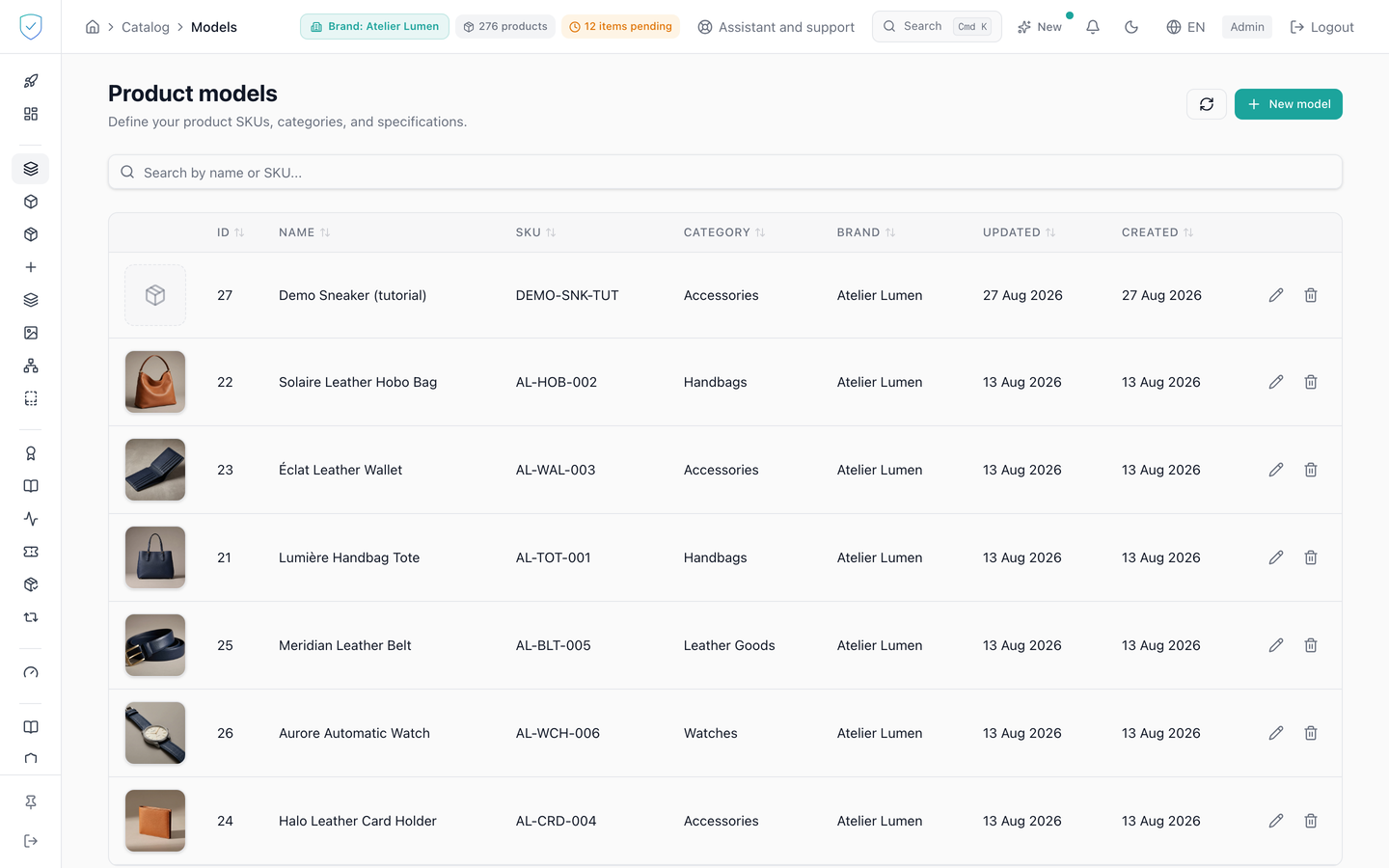
A product model is the template of a reference. This screen lists them all, carries the form that creates and edits them, and opens each one's detail page. You get here through the "Product models" entry of the Catalog section.
#What the screen shows
A paginated table. It asks for 20 rows per page by default, and the selector under the table offers 10, 20, 50 or 100 rows. Changing that number takes you back to the first page: without it, going from 10 to 100 rows while on page 3 would ask the server to skip 300 rows, and the table would come up empty for a brand that does have models.
The list only shows the models of the brand picked in the top bar. The result counter counts that brand and no other, and this holds on every page of the table, not just the first one. Changing brand at the top reloads the table from its first page. When no brand is known, the screen shows nothing at all: it never shows every brand at once.
Until the brand is known, the table asks for nothing and both Excel buttons stay switched off. At start-up this lasts as long as the top bar takes to load your brands, which is an instant.
But the brand can also stay unknown for good: your session has expired, or your account belongs to no brand. The screen then does not spin for nothing. In place of the table it shows "Pick a brand first to see its models.", the refresh button is switched off since there is nothing to reload, and both Excel buttons stay switched off too.
This is deliberate, and it is safer than showing something: asking with no brand would mean asking for every brand at once. On an account that sees several, the table would show models that are not yours, and the export would write the catalogue of all those brands into a file on your disk. A switched-off button beats one file too many.
The create button is labelled "New model". When the list is empty, the screen offers "Create a model" under the text "Models are templates for your products: brand, category, dimensions, compliance metadata. Create one and reuse it across every product instance."
The category field reads "Category (needed to mint a batch)": a model can be created without it, but no batch can be minted while it is missing. The form is fully translated: the GTIN field hint reads "GTIN (8, 12, 13 or 14 digits)" and the image button "Pick from library" in English, their French counterparts in French. The list and the model page name the category in the console's language, like the creation menu.
#Export and re-import your catalogue in Excel
Two buttons at the top of the screen: "Export to Excel" and "Import a
workbook". The export gives you an .xlsx you can edit, circulate, and send
back.
The workbook does not carry the category. A model created by the import therefore has none, and the import report says so: choose it on each new model before minting a batch.
The export returns what the list shows: the brand picked in the top bar, and your current search if you typed one. It covers the whole result, not only the page displayed on screen. Filter first if you only want to send part of your catalogue.
Every export leaves one line in the audit log: the account, the date, the IP address, the brands of the exported models and how many there were. The text of your search is not copied into it. This trace never blocks the export.
#Why Excel and not a CSV
A CSV carries no type, so the spreadsheet guesses. It reads a GTIN as a
number, and the damage is not the one you would expect: 5901234123457
comes back as 59012341234570. Fourteen digits, so it looks perfectly
valid, while it is a false identifier that would go into a passport that is then
signed and anchored.
So our export writes the GTIN column as text, and the import verifies each code's check digit. A code whose check digit fails is refused, with its row number and the reason, and all you have to do is format the column as Text before filling it in.
We never guess a GTIN: once anchored, a guessed code is indistinguishable from a real one.
Every other cell is written as text too. A name or a SKU that starts with
=, written by a reseller or an integration key, reaches your workbook as that
exact text, never as a formula your spreadsheet would run. Sent back unchanged
through the import, it changes nothing.
#The import simulates first
Nothing is written on the first pass. The console tells you what would be created, what would be updated, and above all what is refused and why. You then apply it, if the numbers add up.
A refused row is never skipped in silence.
#An empty cell changes nothing
An empty cell means "leave this field alone". If you completed a model in the console and a file comes back with that column empty, what you typed stays in place. The same goes for the GTIN.
To erase a value, write the word EFFACER in its cell (or CLEAR, in upper or lower case). A model's SKU and name cannot be erased.
A cell holding something unreadable is not treated as empty: a weight written
"250 g" instead of "250" gets the row refused, with its number, instead of
erasing the stored weight. Likewise, a SKU that appears twice in the file is
refused on its second row. A weight or a volume must be an ordinary number
("nan" or "inf" are refused), and a warranty a whole number of months. A
negative weight, volume or warranty gets the row refused, and so does an
instructions address that is not a full web address (https://… or
http://…).
The form applies the same rules on save: a negative weight, volume or warranty
is refused, as is an instructions link that is not a full web address (free
text, javascript: or data:). The cover image is a public web address or an
image of the model's brand's media library, never another brand's.
Changing the GTIN of a model whose reference page is already published follows the same rule as the form: if another brand publishes a page under that code, the row is refused, from the simulation on. Publishing both would make the code's address unreachable for both brands. Likewise, the GTIN of a model one of whose batches has a published passport is frozen: the row that changes it is refused, as in the form.
To create a model, the file must give its name. To update an existing model, only the SKU is required: the other columns may stay empty.
Spaces around a SKU do not count. A SKU a connector stored as "ABC-1 ", with a trailing space, is recognised in the row "ABC-1": sending the export back unchanged creates no model. If two stored models differ only by those spaces, the row is refused, with its number, because we do not pick one for you.
#See what would be replaced before applying
The simulation counts the models to create, to update, and those the file leaves unchanged. Above all, it lists every value already saved that the file would replace or erase: the model, the column, the saved value and the value in the file. The apply button then states how many values it will replace. Filling a field that was empty is not in this list, since nothing is lost.
The button applies exactly what the simulation showed. If someone changes one of those values in the meantime, in the console for instance, or creates or deletes one of the models the file would create, applying is refused with the message "Le catalogue a change depuis la simulation": run the simulation again to see the current values.
#The change history
When you edit a model, the bottom of the form shows its history: for each change, the date, the account that made it, its origin (console, Excel import or a catalogue connector sync, with its name: Salsify, Akeneo, Shopify...) and, field by field, the old and the new value. Each field carries the name it has in the form, and each value reads in the console's language: the category by its name, a choice by its label, a checkbox as "yes" or "no". A creation records only what you typed, never a value the server fills in by itself. You can see who changed a value, when, and through which path. The history starts when this feature went live: older changes are not in it.
#What you can do here
Search for a model. The text you type goes to the server, which compares the name and the SKU: the search covers the whole catalogue, beyond the rows already loaded.
Create a model, or reopen one to edit it. Landing on /catalog/models?edit=<id> opens that model's form directly, which is the path the "Edit" button on a model's detail page takes: the form then reloads the full model, because the list does not carry its compliance fields. Choose its cover image from the brand's media library. Click a row to open the model's detail page, at /catalog/models/{id}. Change the number of rows shown. Delete a model by retyping its SKU.
#Every model is at units
The form asks no question about the identity level. Every new model is at units, like those a connector or a spreadsheet import creates: each piece created from it gets its own token and its own QR code, and counts among the pieces of your year. Its page shows the passport of its batch, or else the passport of the model.
Editing a model still set to model passport only does not change that setting. It is changed from the model's detail page, with "Create units for this model".
#Conformity is not declared here
The form asks for no CE marking, no declaration number and no EU type-examination certificate. Those declarations are made on the passport, where the same information exists in full and where it is published, signed, anchored and read by an authority. Asking in two places would let the two contradict each other with no way to tell which is true.
#What gates access
The save button stays off as long as the name or the brand is missing, and during the save itself, while the server answers. The "Pick from library" button stays off as long as no brand is chosen, with the tooltip "Select a brand first".
Editing never accepts a change of brand: the field is not sent and the update schema forbids it, because it would amount to transferring the model to another tenant. The server also caps page size at 100 rows.
#What the screen refuses
On creation, a brand outside the account's scope: the server answers 403 Accès interdit à cette marque.
On deletion, the text you type must be the model's own SKU, and an empty expected value never enables the button. A model with no SKU shows "This model has no SKU. The server has nothing to compare a confirmation against and refuses the deletion. Give the model a SKU first."
Changing the GTIN of a model whose batch has a published passport: 409, "One of this model's lots has a published lot passport". The GTIN is printed in the GS1 link of that batch and sealed in its passport's data. The Excel import likewise refuses the row that would change that GTIN, and names it by its SKU.
Three further refusals come from the server, all 409: a model referenced by products, "Cannot delete: {n} products reference this model"; a model whose batch is anchored on the chain, "Cannot delete: {n} linked batch(es) are anchored on-chain"; a model whose batch is protected, the answer then naming each blocking batch and its blockers.
The confirmation dialog states what the deletion takes with it: the batches, the bill-of-materials components, the EU substance-of-concern declarations, and the detaching of media. None of it can be recovered.
Was this page helpful?
Your answer opens a pre-filled email in your mail app, addressed to contact@sealtrust.io. You read it over before sending it.