

Product events
The history of lifecycle events attached to the brand's products, with manual entry of an event when it did not come up on its own.
This screen is the log of product lifecycle events: repair, servicing, after-sales service, refurbishment, warranty activation or extension, inspection, quality control, certification, distribution, resale, return, donation, recall, recycling, destruction, end of life. You open it to review what has already been recorded, to filter by type or by product, and to add an event by hand.
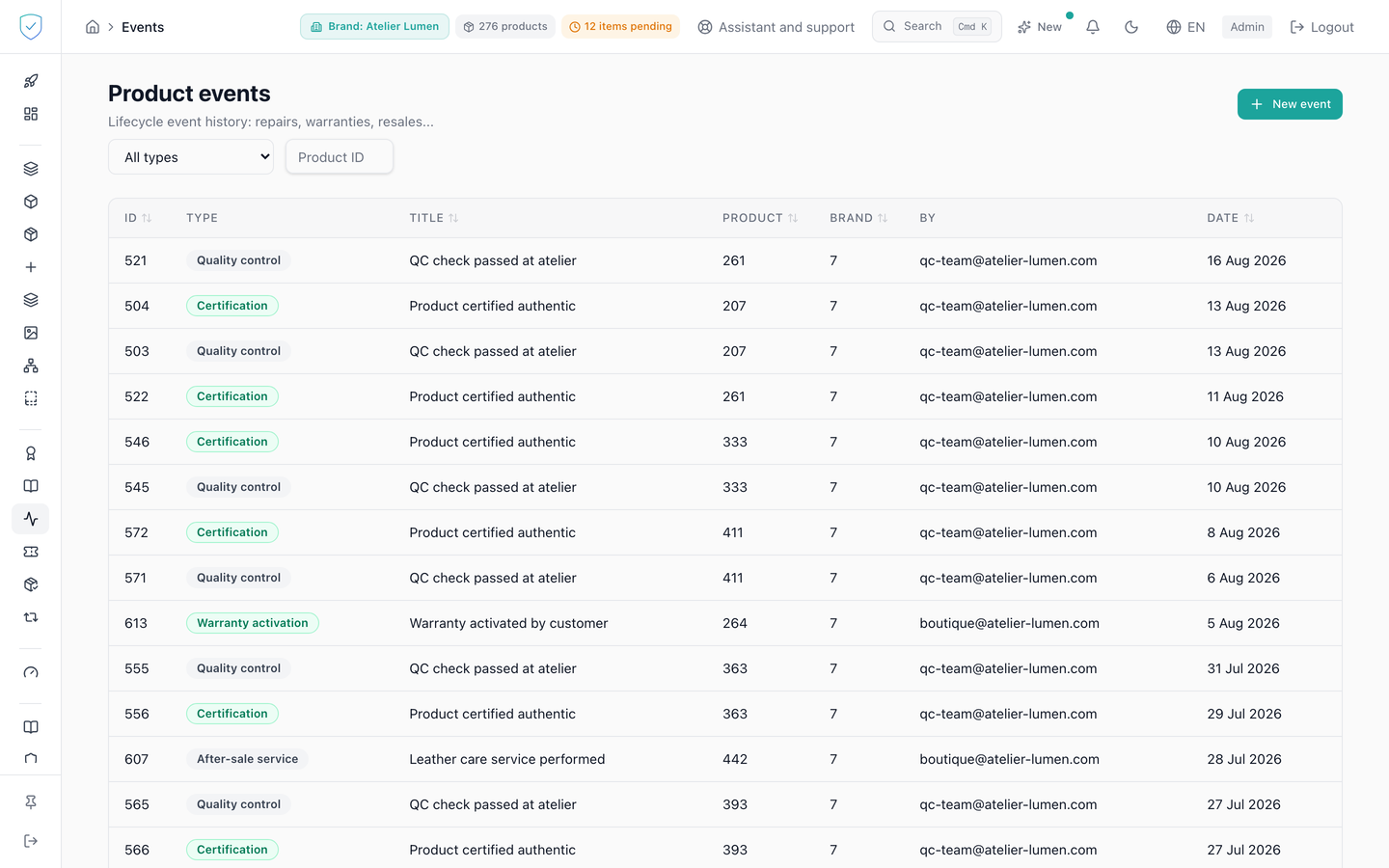
#What the screen shows
The "Lifecycle event history: repairs, warranties, resales..." subtitle, then two filters side by side: a type dropdown whose first option is "All types", and a "Filter by piece: serial number or name" field.
A table with seven columns: ID, "Type", "Title", "Product", "Brand", "By", "Date". It shows 20 rows by default, from the most recent to the oldest on the date of occurrence. The type is rendered as a coloured badge: red for a recall or a destruction, orange for a repair, a servicing or a return, green for a warranty activation or extension, a certification, a recycling.
With no event: "No event recorded. Events are created during product scans, transfers or repairs.".
#What you can do here
Open the form with "New event", close it with "Cancel". It asks for the piece, in the "Piece: serial number or name *" field, the type, "Title *", "Description (optional)" and "Performed by (optional)". The type is chosen among eighteen values, custom being offered by default. The piece is picked by the serial printed on it (in full, or by its first four characters at least) or by its name; each result shows the serial first, then the lot code. The event's brand is the piece's own: it is no longer asked for separately.
Filter on a given type or on a piece: each of these two filters resets pagination to the first page. Sort on the identifier, the title, the product, the brand and the date. Change the number of rows per page and move from page to page.
#What governs access
A signed-in administrator account, otherwise the screen only shows "Loading...". The "Product events" sidebar entry is visible for every brand profile, and no plan is required. The list only shows the events of the brands the account can reach.
The "Create" button stays inactive as long as the piece and the title are not filled in. The server also checks that the piece belongs to the brand sent, which is its own.
#What the screen refuses
A brand the account has no access to: 403. An unknown product, or one of a brand the account has no access to: 404, "Product not found". A product of another of the account's brands, not matching the brand sent: 400, "Product brand_id does not match event brand_id". A brand on the Compliance offer: 403 with the code OFFER_EXCLUDES_IDENTITY, and nothing is written, even on a piece that kept its identity.
A type outside the closed list is rejected at validation; the value entered is lowercased before being compared. A title that is empty or reduced to spaces is refused with "title must not be empty". Asking for more than 100 rows at once is refused.
This screen offers neither editing nor deletion: only creation, listing and reading of an event exist.
Was this page helpful?
Your answer opens a pre-filled email in your mail app, addressed to contact@sealtrust.io. You read it over before sending it.