

A product's detail page
Everything the platform knows about one item: chain, chip or QR code, certificate, passport, warranty, buyback, scans and owners.
This is the reference page of one physical item. It gathers what is written on chain, its authentication carrier, its certificate, its passport, its scans and its successive owners. You also open it to repair a missing model link, set a warranty, offer a buyback or withdraw the unit from the catalog.
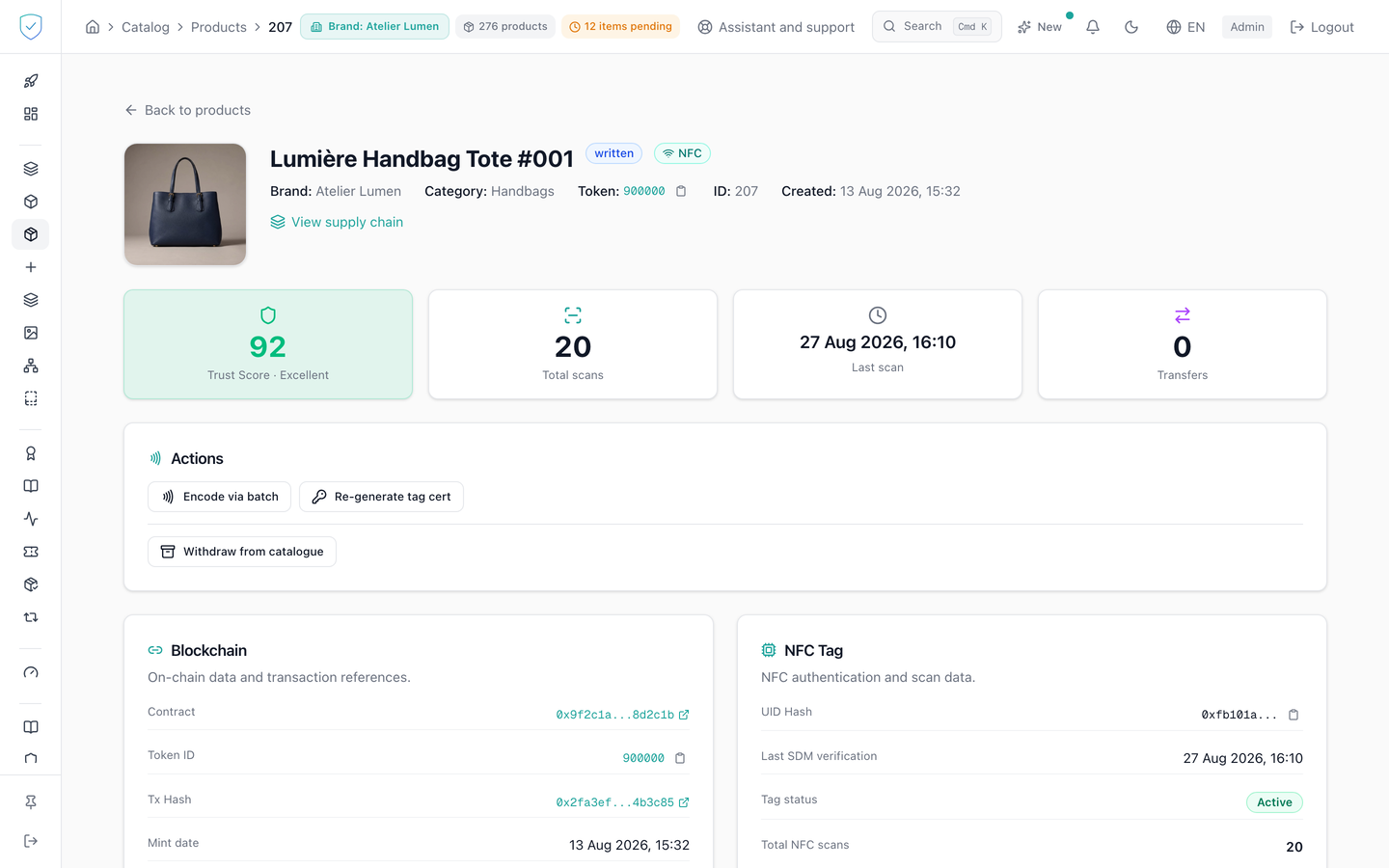
#What the screen shows
- Header: image, name (or "Unnamed product"), status, authentication method, the "Frozen" and "Burned" mentions when they apply, then brand, category, token, identifier and creation date.
- Four tiles: trust score, total scans, last scan, number of transfers.
- Blockchain: contract, Token ID, transaction hash, mint date, metadata address in IPFS or in HTTP, on-chain status, links to the explorer.
- NFC Tag, for a chipped unit: UID hash, last SDM verification, tag status, number of scans, last location, fraud alerts. Otherwise, the screen shows "Not applicable: this product uses QR code authentication only.".
- QR Code, for a unit with a printed code: image requested at 320 pixels, verification URL as the server returns it, generation date, scan counter. The download button requests 600 pixels. The address shown is exactly the one the image encodes, and it carries your brand's domain once that domain is verified and final, ours otherwise. A domain that is only verified can still change, and a printed label cannot: see "A printed code waits until the domain is final" in the domain settings.
- Certificate, then Digital Product Passport with its materials, its suppliers and its components.
- DPP readiness score out of 100, as a ring, with seven dimensions (identity, materials, suppliers, life cycle, compliance, substances, evidence) and up to eight gaps listed. ⚠️ The last two currently show under their technical name,
substancesandevidence, for want of a translated label. - Warranty and Buyback offer.
- Shipment: the B2B order the unit was picked into, its distributor and its territory, then the orders it was removed from. The card only appears for a unit that went through a B2B order.
- NFC scans: a timeline limited to 20 records, with city, country, device, CMAC validity and trust score variation.
- Ownership: the transfers and the current owner.
#What you can do here
"Encode via batch" opens the batch of the unit to encode its tag. "Re-generate tag cert" asks for a confirmation, then opens the encoding screen; the dialog warns that the tag will have to be scanned again to receive the new certificate. The unit is not passed to that screen, which works per encoding batch rather than per unit: scanning the chip is what designates it. "Link to a model" repairs a missing link, by choosing a production batch or a model.
"Withdraw from catalogue" takes the unit out of the list under the archived reason, or under the superseded reason while naming the unit that replaces it. That reason is written into the status of the unit, the on-chain token is not touched.
The page also serves to create, modify or cancel the warranty (duration in months or end date, conditions, transferability), to offer a buyback with an amount, a currency and a validity in days, to open or issue the certificate, to create or modify the passport, and to open the supply chain of the model.
#What conditions access
The page opens whatever the life cycle status of the unit: a withdrawn unit stays readable here, while the lists stop showing it.
The two physical encoding buttons depend on the profile of the brand. The basic and dpp profiles see neither minting nor encoding: the page shows "Physical tag encoding is handled by SealTrust for your plan." and stays entirely readable. A brand on the Compliance offer does not see these buttons either, and the page shows it "NFC encoding is not part of the Compliance offer." "Encode via batch" requires a batch. "Re-generate tag cert" requires a Token ID and a unit that carries a CHIP: a tag certificate has nothing to write on a QR-only unit, so the button does not show there. The "Link to a model" block shows as soon as one of the two links is missing, the model or the batch, and the message says which one. Until 31 August 2026 it only looked at the model: a unit created through the direct creation form, which asks for no batch, therefore stayed without a batch and with no way at all to repair it from the interface. Since anchoring happens PER BATCH, such a unit could never be anchored. The DPP readiness score is neither requested nor displayed unless the unit has a model.
The withdrawal button disappears when the unit is already withdrawn, replaced by "This product has been withdrawn from the catalogue" followed by the reason. Under superseded, it stays inactive as long as a fully numeric replacement identifier has not been entered. The buyback requires the brand to have enabled it and the unit to be held by a consumer.
#What the screen refuses
- The
supersededreason without a replacement identifier: 400, with the invitation to usearchivedwhen the unit replaces nothing. Thearchivedreason accompanied by a replacement is refused the same way. - A unit that would supersede itself: 400, "A product cannot supersede itself".
- A replacement that cannot be found, or of a brand the account cannot see: 404. A replacement from another of the account's brands, or itself already withdrawn: 400.
- A unit already withdrawn under another reason: 409.
- A model linked to a unit already linked to another one: 409, as long as re-pointing the link is not requested explicitly.
- A model or a batch of a brand the account cannot see: 404, like an unknown identifier. From another of the account's brands: 400, as is a model that contradicts the batch the unit was produced from.
- A unit moved into a batch already anchored on chain, or out of such a batch: 409.
- A buyback on a brand that has not enabled it: 403, "This brand does not offer buybacks". A unit still in the brand vault: 409. An offer already open on the same unit: 409.
- A unit attached to no brand, or to a brand the account cannot see: 404, "Product not found", the same answer as an unknown identifier, except for a superadmin account. The rule holds on reading as well as on withdrawal, both paths calling the same check.
The validity of a buyback offer is proposed at 14 days by default.
Was this page helpful?
Your answer opens a pre-filled email in your mail app, addressed to contact@sealtrust.io. You read it over before sending it.