

DPP templates
A library of passport templates per product vertical, expanded to see the detail and sent on to passport creation.
On this page
The screen lists the passport templates shipped by the platform, plus the ones your brand has built for itself. Each template states which components and which events the vertical requires, and offers a pre-filled DPP data skeleton. You open it before creating a passport, so you do not start from a blank page.
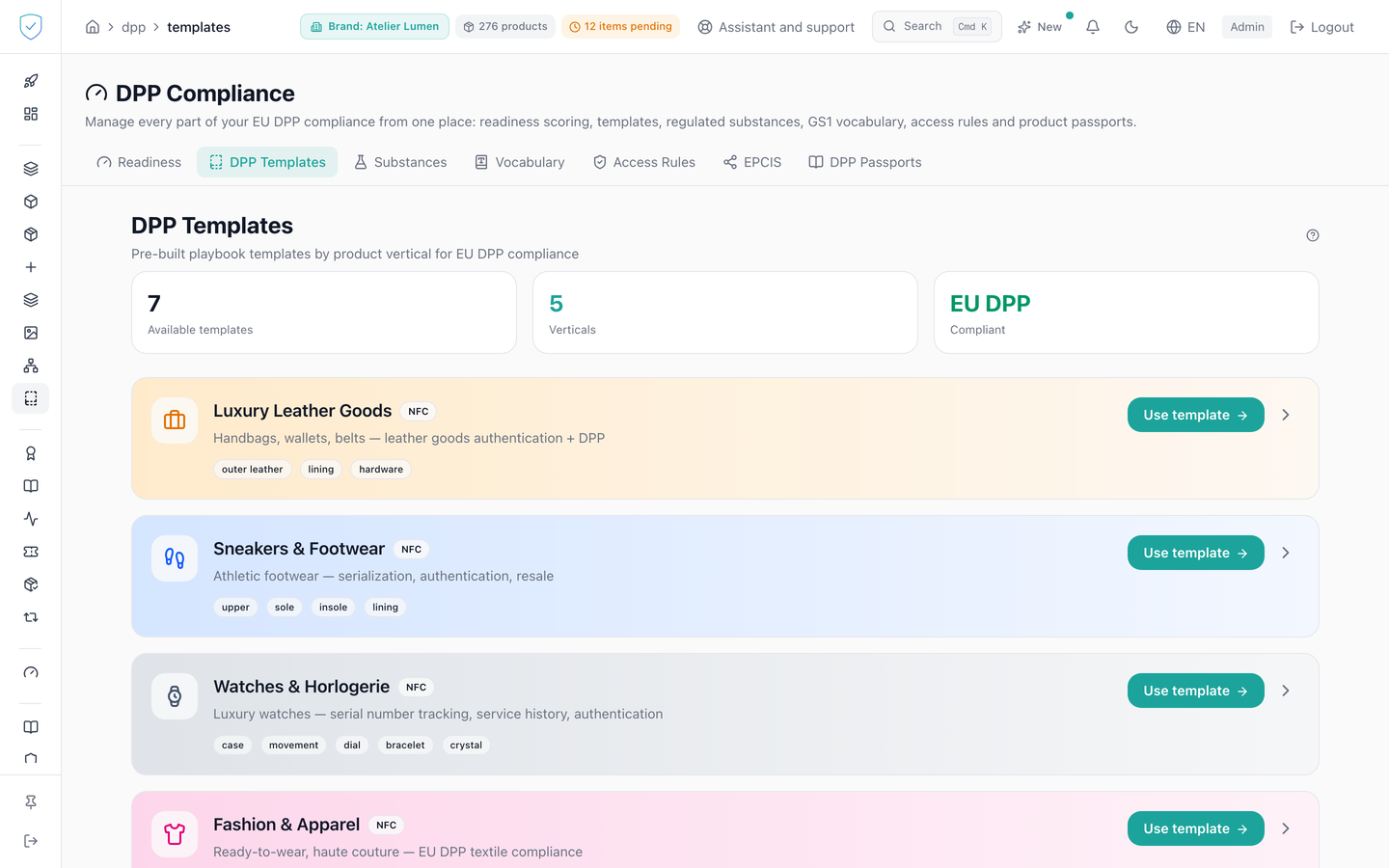
#What the screen shows
- Three figure tiles at the top: the number of templates loaded, a Published verticals tile counting the verticals that are no longer drafts, and the EU DPP mention under Compliant. That tile used to show a hard-coded 5 next to a computed total, so the two could contradict each other.
- One card per template, with an icon and a colour of its own for the vertical. Eight verticals are provided: leather goods, sneakers, watches, fashion, battery, consumer electronics, construction products, beauty and perfume. A template of your own brand takes the icon of the vertical it declares (a beauty or perfume template, for instance, wears a spray bottle) and, when it declares none, a neutral template icon: it no longer borrows the leather-goods briefcase. The name and description of a provided template are shown in the console's language, and a template of your own brand keeps the name you gave it.
- The template name, its description, and a data carrier badge when the template declares one: QR for a QR carrier, NFC for any other value. A template that declares none shows no badge at all, which is the case for every custom template.
- A Draft badge on templates that are still anticipatory.
- The required components, as small labels under the description.
- A use button and an expand chevron on every card. The button always fits on one line; on a narrow screen it moves under the card's text.
- Once the card is expanded: the required events as labels, then the template preview as indented JSON.
#What you can do here
- Expand a card to load the template detail. The detail is fetched on the first expand only, then kept in memory: reopening the same card does not call the server again.
- Read the template DPP data skeleton in JSON.
- Click the use button to open passport creation with that template already applied. The button creates nothing by itself, it takes you to the passports screen.
#The template arrives empty, and that is deliberate
A template holds no value: every field is empty. What you see greyed inside a passport field is an example, there to show the expected shape, and it is never saved.
Before 13 September 2026 the templates shipped real values, such as "Recycled aluminium 30 %". The passport form picked them up, and a brand that saved without rewriting every line published invented materials on a document that is signed and anchored. The examples now travel beside the template, not inside it.
A number you do not give stays empty, never 0. Carbon footprint, water, energy, transport, recyclability, recycled content, repairability, lifetime, the share of each material: a template pre-fills none of them. Until 27 September 2026 they arrived at 0, and a brand that did not erase them published "Recyclable 0 %", an absence shown as a fact. A field left empty is not published, and the public page shows nothing in its place. A 0 you type yourself is an answer, and it is published.
A template lays out only the main material. The other parts your product may have (lining, buttons, zipper, thread for fashion; hardware for leather goods; movement, crystal, bracelet, dial for watches, and so on) are offered under the materials, under "Other parts, if your product has them". A click adds the row, empty. A T-shirt has neither lining nor zipper: it no longer starts with them. The only exception is a row the score requires: a shoe keeps its sole next to its upper.
#The "Beauty and perfume" template is voluntary
No delegated act of the Ecodesign Regulation (ESPR) covers cosmetics: no passport is mandatory for a perfume or a skincare product. The "Beauty and perfume (voluntary)" template exists for the brand that wants to publish one anyway. It carries the mentions that Article 19 of Regulation (EC) No 1223/2009 already requires on the packaging:
- the responsible person, name and address, in a section of its own, because it is not always the brand;
- the ingredients list (INCI names), the function of the product, the nominal content, the period after opening (PAO, in months) or the date of minimum durability, and the precautions for use, under "Ingredients";
- the container (glass, aluminium...) as the main material, the outer packaging being offered separately.
The batch number is not in it: it belongs to the lot, which the platform already carries. The country of origin is owed only by an imported product (Article 19(1)(a)): the score therefore never counts it as missing, it recommends it while the country of manufacture field is empty. The template's default data carrier is the QR code, since a perfume is labelled far more often than it is chipped.
The responsible person may be a natural person. Under their name and address, the console shows the personal data warning: the passport hash is written on the chain, and what is typed there stays there. All these mentions are public on the passport, since they are already printed on the box. The template carries no ESPR box: a text that does not apply is absent, never "not met".
A template of your own brand is created through the API for now (POST /admin/dpp/playbooks/custom): the console has no screen for it yet. Declare the beauty vertical in it so that it is scored on the same mentions.
#What governs access
The tab sits behind the DPP workspace profile guard, and the DPP templates entry in the side menu stays visible but locked for the basic brand profile.
The list mixes the platform built-in templates and the active custom templates, the latter restricted to the brands your account can reach. Each custom template is served with its declared vertical (vertical), or null when it has none. A built-in template that declares no data carrier is served with the value nfc.
#What the screen refuses
- A template requested under an unknown key is refused, and the message lists the valid keys.
- A custom template belonging to another brand is refused with "Custom playbook not found", the same answer as an unknown identifier.
- An administrator account attached to no brand is refused as soon as the list loads.
- If loading fails, a red banner shows the server message, or failing that a template loading error.
Was this page helpful?
Your answer opens a pre-filled email in your mail app, addressed to contact@sealtrust.io. You read it over before sending it.