

Reversibility and export
Request a full archive of everything SealTrust holds for your brand, follow its preparation, and download it.
On this page
- What the screen shows
- What you can do here
- What controls access
- What the screen refuses
- What the archive holds, and how to re-verify it without us
- The quickest way: run the verifier shipped with the archive
- The inclusion proof, and why it is indispensable
- A batch we cannot rebuild is named
- What survives SealTrust, exactly
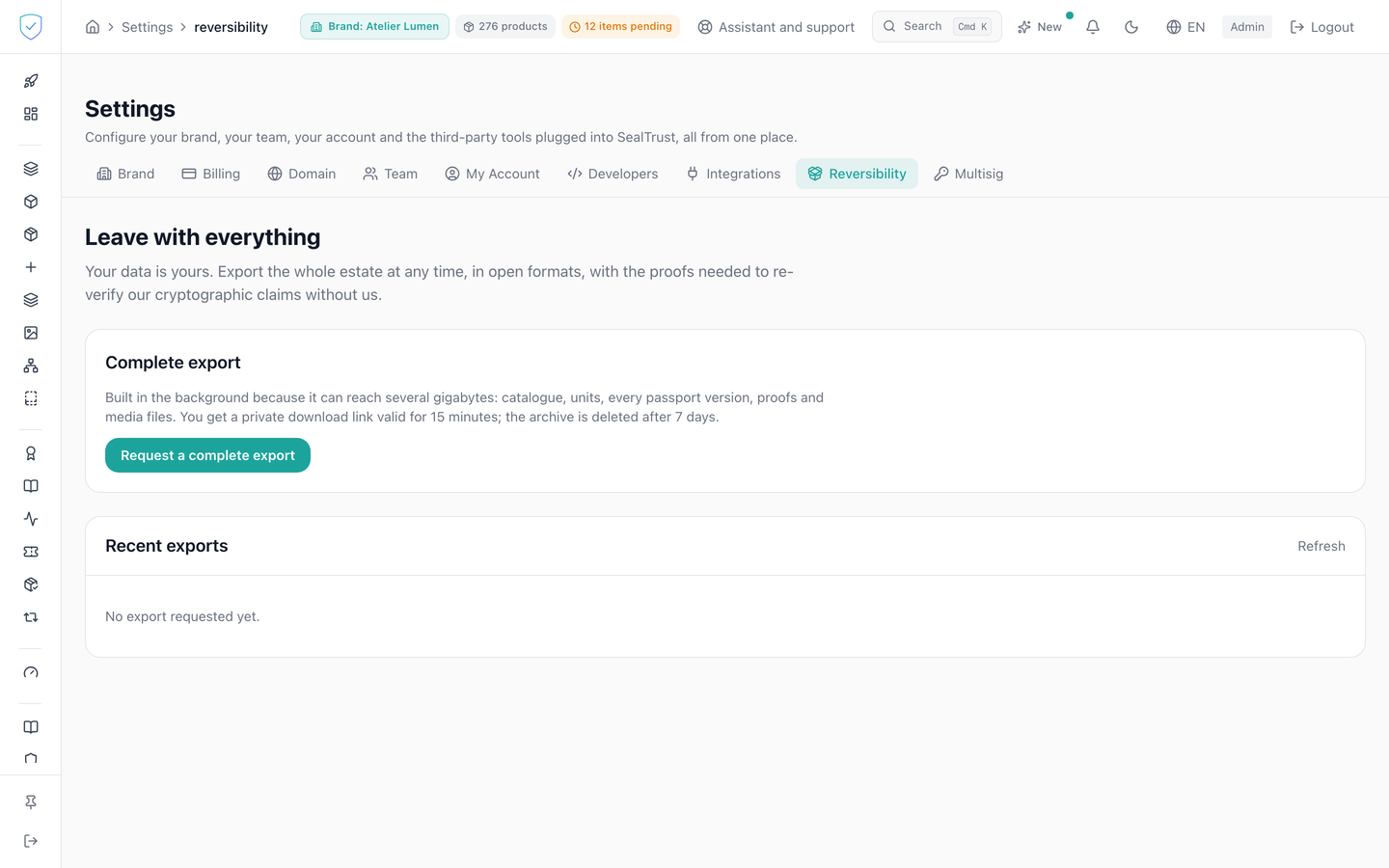
This tab is where you take your estate back: catalogue, items, every passport version, proofs and media files. The archive is prepared in the background, because it can weigh several gigabytes. The recent exports table shows the progress, and a download link appears once the archive is ready.
#What the screen shows
- A "Leave with everything" heading and a paragraph recalling that this data belongs to you, that it is delivered in open formats, and that it carries the proofs needed to re-verify without SealTrust.
- A "Complete export" card describing the archive content, announcing a private download link valid for 15 minutes, and an archive deleted after 7 days.
- A "Recent exports" table of five columns: the number, "Status", "Units / passports / media", "Size", and the action column.
- Each export's raw status, green for
completedand red forfailed, with the error message right underneath when there is one. - The number of missing media in brackets, in amber, when there are any.
- The size formatted in B, KB, MB or GB.
- When nothing has been requested yet: "No export requested yet."
#What you can do here
- Request an archive with "Request a complete export". The request always carries the media files.
- Refresh the list by hand with "Refresh". While an export is pending or running, the list reloads on its own every 10 seconds.
- Download a finished archive with "Download", which opens a signed link in a new tab.
The request for an archive and every download link handed over leave one line in the audit log: the account, the date, the IP address and the brand. This trace never blocks the export: taking your estate back is a right, and the file is served even if the line cannot be written.
#What controls access
- The "Reversibility" tab is visible for every profile, with no plan condition.
- The request card and the table are only rendered once a brand is chosen in the top bar. An export always covers a single brand, the one in that bar.
- The download button only appears on a downloadable row, meaning one that is finished and has a file.
- The download link is signed and valid for 900 seconds. Past that, come back to the screen and ask for it again.
- The history shows at most the 20 most recent exports, newest first.
- The scope check on a download bears on the export's own brand.
#What the screen refuses
- No brand chosen in the top bar: a block invites you to pick one, and neither the request button nor the table appears.
- An export already pending or running for the same brand: "An export is already {status} for this brand (id ...)". Wait for it to finish before asking for another.
- Queue unavailable: "Export queue unavailable." The row is then marked
failed. - Downloading an export that is not finished: "Export is {status}."
- Export that does not exist: "Export introuvable."
- Brand outside the account's scope: "Marque introuvable.", the same message as for a brand that does not exist.
#What the archive holds, and how to re-verify it without us
The archive is a ZIP file. It carries a README.md repeating what follows, so it stays readable even if you open it years later.
| Folder | What it holds |
|---|---|
catalog/ | Your product models, components and suppliers. |
units/ | Your units, with their token id and mint transaction. |
passports/ | Every version of every passport, each with its SHA-256 fingerprint. |
proofs/ | The anchors: chain, contract address, transaction, and the path proving inclusion. |
identity/did.json | Your public signing keys. This file is what makes your credentials verifiable without us. |
media/ | Your images and documents, with a MISSING.json if one could not be embedded. |
verify.py | The verifier. It re-does every check described below, on its own. |
manifest.json | What was written, and what was not. |
#The quickest way: run the verifier shipped with the archive
The archive contains verify.py. It needs nothing installed, not even a cryptography library: it recomputes everything itself. An archive meant to outlive our service cannot depend on software you would still have to be able to install in ten years.
python3 verify.py .              from the extracted folder
python3 verify.py archive.zip    or straight on the ZIP file
python3 verify.py . --offline    without querying the chain
It re-does four things: each passport's fingerprint, its fingerprint inside the batch, walking the path up to the batch fingerprint, then reading the anchoring transaction to compare. For that read it asks a public node of the chain named in proofs/anchors.json; the --rpc option names another one. It prints one line per passport, with the date that counts, and exits with an error if a single check fails. If it cannot reach the chain it says so and does not declare itself verified: an archive consistent with itself proves nothing on its own.
What follows describes what that script does, so you can audit it or write your own.
#The inclusion proof, and why it is indispensable
Passports are not anchored one by one. They are grouped into batches, and a single fingerprint summarising the whole batch is written to the public register. That is what keeps the cost roughly the same for one passport and for ten thousand.
The consequence is that holding your passport's fingerprint and the fingerprint written on chain is not enough: you also need the short computation path linking the two. Without it you cannot show that one specific passport was part of the anchored batch.
That path is now written into the archive. For every anchored version of every passport, proofs/anchors_passports_*.json carries, under anchored_versions:
merkle_root, the batch fingerprint, the one written on chain;leaf, your passport's fingerprint inside that batch;leaf_index, its position;proof, the computation path;tx_hash, the transaction, andblock_timestamp, the only opposable date.
To re-verify, feed leaf and proof to any sorted-pair Merkle verifier, the OpenZeppelin convention, and check the result equals merkle_root. Then check, on the public explorer named in proofs/anchors.json (for example basescan.org for Base), that this fingerprint is the one the transaction carries. No SealTrust address is involved.
#A batch we cannot rebuild is named
If a batch cannot produce a valid proof, it is not passed over in silence: it appears under unprovable_batches in proofs/anchors.json, with the reason. A proof that is absent and announced beats a proof that is wrong, which you would only discover on the day you needed it.
#What survives SealTrust, exactly
The distinction matters and we would rather write it down:
- The date is unconditionally acquired. It is written in a public register nobody, us included, can withdraw.
- The content is yours to hold, and that is precisely what this archive hands you.
- The IPFS copy is not a survival guarantee. That network keeps nothing on its own: a document stays reachable only while someone pins it, and today that someone is SealTrust. If you want that copy to outlive us, pin the
ipfs_uriaddresses on your side, with the provider of your choice.
Was this page helpful?
Your answer opens a pre-filled email in your mail app, addressed to contact@sealtrust.io. You read it over before sending it.