

Passport access rules
Decide who sees which passport field: the six access tiers shipped by default, and the custom rules a brand adds field by field.
On this page
The European regulation does not give the same passport to everyone. This screen shows the table shipped by the platform, which files every field path under an access tier, and lets you override it brand by brand.
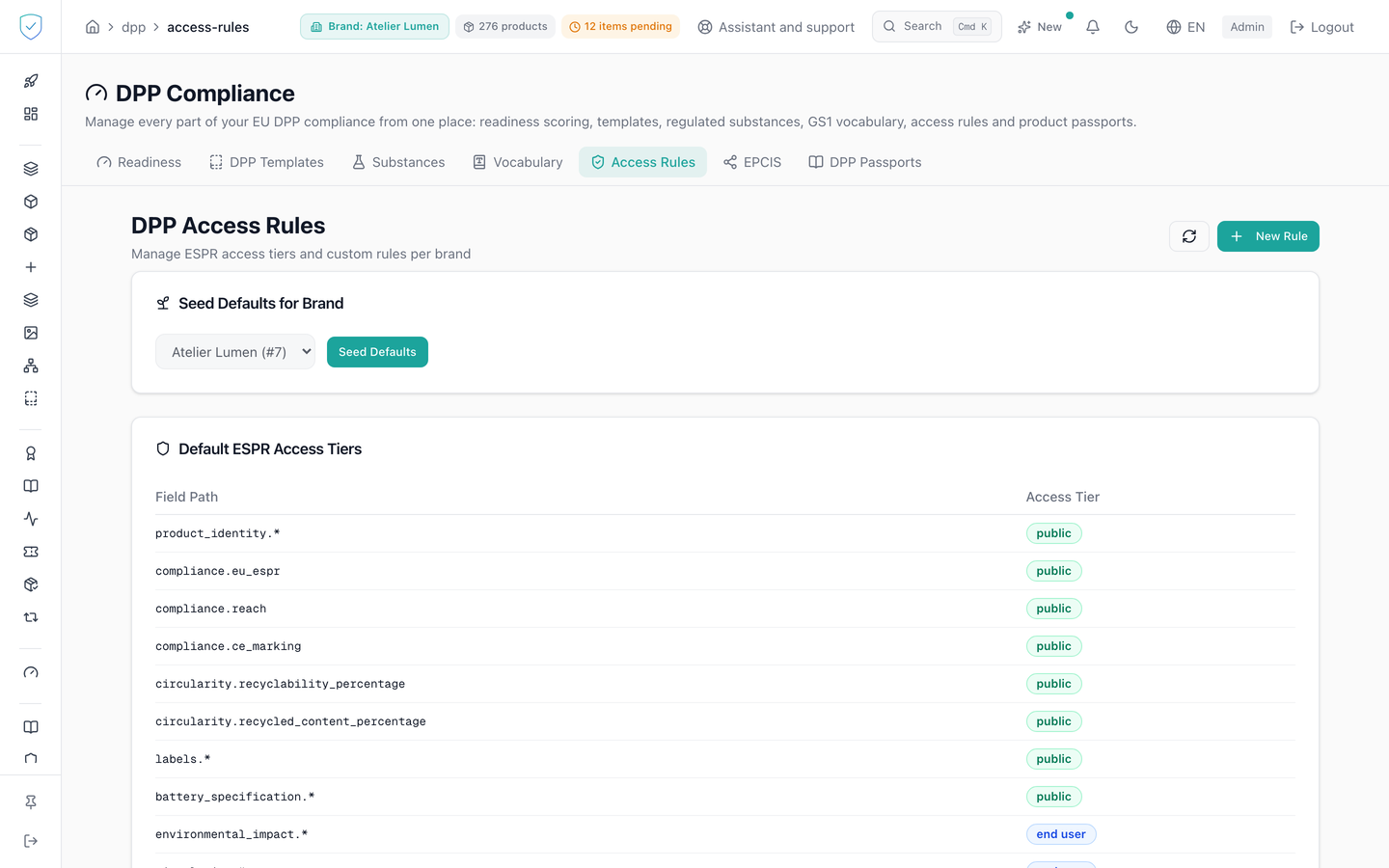
#What the screen shows
- A DPP access rules header, a subtitle about managing the default access tiers and custom rules per brand, a refresh button and a new rule button.
- A card to seed the default values for a brand, with a brand selector and a seed button.
- A default access tiers card: a two column table, field path and access tier, the tier shown as a coloured badge.
- A custom rules per brand card: a table of ID, brand, field path, access tier, product group, actions. ⚠️ A brand is mandatory: the column is NOT NULL in the database and the schema refuses it empty. The "global" display the code provides for is therefore never reached. The save button only checks the field path: an account attached to several brands, or a superadmin, who saves without picking a brand receives a 422.
- A creation or edit window with four fields: brand, field path with the example
materials.composition, access tier as a dropdown, and product group, optional.
The dropdown offers exactly six tiers, the ones the server accepts: public, end_user, repairer, recycler, upstream, authority. By default the authority tier gets the pattern *, meaning every field of the passport.
⚠️ These six values are not ordered from narrowest to widest.
repairer,recyclerandupstreamare three distinct audiences: each one adds, to the consumer baseline, what its own trade requires, and none of them contains another's fields. An accredited recycler therefore does not read the bill of materials reserved for the repairer, and holding one accreditation opens none of the others. Onlyauthorityreceives the entire set.
#What you can do here
- Seed the default ESPR rules for a brand in one go. The operation is repeatable: nothing is deleted or changed, only the missing paths are added, and the answer states how many rules were created and how many already existed.
- Seed again to receive the paths the platform has added since. ⚠️ A path your brand already names, at any tier, is left as it is: if you moved
care.*from the owner to authorities, seeding does not reopen it to the owner. - Create a custom rule by choosing a field path and one of the six tiers.
- Edit an existing rule. The brand of a rule cannot be changed here, it is never sent back to the server.
- Delete a rule with the bin icon.
- Refresh the two tables in one click.
#What governs access
The tab sits behind the DPP workspace profile guard, which excludes the basic brand profile. The seed button stays disabled until a brand is chosen, and the save button of the window until the field path is filled. A product group left empty is sent with the value general, never with a null value.
The custom rules list comes back in pages of 50, sorted by access tier then by field path. For an administrator attached to a single brand, the brand selector is locked and pre-filled.
Some fields escape your rules, because a law makes them public. They stay on the public part of the passport even if your rules do not mention them, and they are the only ones:
- the manufacturer's identification, that is their name, postal address and means of contact. The EU ecodesign regulation places them on the public part of the passport;
- on a textile passport, the name and the percentage of each material, and the
compositionwritten at the root (only the fibre and its share, when it is written as rows). This is the fibre composition that Regulation (EU) No 1007/2011 requires on the label, and wants visible before the purchase, online included. The origin of a material is not part of it and still follows your rules; - on a footwear passport, the material of the upper, the lining, the insole and the sole, including when written at the root (
upper_material,lining_material,insole_material,sole_material). This is what Directive 94/11/EC puts on the shoe. No percentage, no origin; - on a battery passport, the data that Annex XIII of Regulation (EU) 2023/1542 declares public.
A passport created with the "Fashion & Apparel" template carries the product_group field set to textile, and with "Sneakers & Footwear" set to footwear: that field is what identifies it, even if you rename or remove its material rows. An older passport without it is identified by its primary_fabric or upper row. Only the name and the percentage of each row go out, never what you store under a row (a supplier, for instance). Everything else obeys what you write here.
#Fields written at the root of the passport
The console's passport form writes the fields specific to each product type at the root of the data: care_instructions, composition, size, leather_type, battery_chemistry, and so on. Each of these fields has its own default tier, named one by one in the default tiers table. None of them is opened by a generic pattern.
The rule followed is always the same:
- when the same information already exists elsewhere in the passport, with its own tier, the field written at the root takes exactly that tier. The care instructions
care_instructionsfollow thecaresection, so the owner of the product sees them; - when a law requires the information on the label, it is public: the fibre composition of a textile, the material of the upper, the lining, the insole and the sole of a shoe, and the mentions of a cosmetic that Article 19 of Regulation (EC) No 1223/2009 puts on the packaging (responsible person, nominal content, PAO or date of minimum durability, ingredients, function, precautions for use);
- size, colour and weight (
size,color,weight) are public: they are printed on the label and shown by every seller, and in GS1 each size or colour variant has its own GTIN, so a model passport attached to a GTIN is for one size and one colour; - otherwise the field stays reserved to market surveillance authorities.
| Tier | Fields written at the root |
|---|---|
public | product_name, brand, country_of_manufacturing, country_of_origin, composition, upper_material, lining_material, insole_material, sole_material, size, color, weight, size_system, model_identifier, product_category, product_family, intended_use, batch_or_serial_identifier, manufacturer_identifier, manufacturing_date, manufacturing_place, weee_producer_number, recycled_content_percentage, battery_category, battery_chemistry, nominal_capacity, nominal_voltage, battery_weight_kg, critical_raw_materials, responsible_person_name, responsible_person_address, nominal_content, minimum_durability_or_pao, ingredients_list, cosmetic_function, precautions |
end_user | care_instructions, repairability_details, leather_type, energy_efficiency_class, eprel_id, spare_parts_availability_years, software_update_support_years, declared_service_life_years, deconstruction_information, reuse_recycling_information, epd_reference, global_warming_potential_kg_co2e |
repairer and recycler | dismantling_information, fire_safety_information |
recycler | battery_status |
authority only | dimensions, description, category, recyclability_score, tanning_method, animal_origin, finish, hardware_material, waterproof, recycled_content, expected_lifetime_cycles, durability_details, rohs_compliant, hazardous_substances, the fields of a construction product's declaration of performance and of its safety section |
A composition can also be written as rows, each with material, percentage, is_recycled and certification. The public then reads only the fibre and its share, as on the label. The "recycled" claim and the certificate stay with the recycler and upstream tiers. A key nobody named, a supplier for instance, does not go out.
On a battery passport, hazardous_substances is public, as Annex XIII of Regulation (EU) 2023/1542 requires. On any other product it stays reserved to authorities.
⚠️ If your brand has its own rules, this table no longer applies to it: its rules decide. A field added to the defaults after you seeded your rules therefore does not reach you on its own. Seed again to receive it.
#What the screen refuses
- An access tier outside the six allowed values is refused at validation, and the message lists the six values.
- An empty field path is refused: "field_path must not be empty".
- On a battery passport, a rule that would open a field Annex XIII of Regulation (EU) 2023/1542 reserves is refused, and the message names the field and the tier. That covers part numbers, battery state and expected lifetime in cycles at the
publictier. A brand preference cannot depart from the regulation: the rule would be stored with no effect at all, so it is refused rather than silently accepted. Business tiers keep their access where the regulation grants it, a repairer for instance. - Creating a rule or seeding the defaults on a brand outside your scope is refused: "Access denied for this brand".
- A rule that does not exist or is out of scope is refused: "Access rule not found".
- The bin icon deletes the rule immediately, with no confirmation window.
Was this page helpful?
Your answer opens a pre-filled email in your mail app, addressed to contact@sealtrust.io. You read it over before sending it.