

The alert center
Gather in a single feed, sorted by severity then by date, the clone alerts, the products declared stolen, the open gray-market alerts and the failing webhooks.
The signals that call for a reaction are scattered across several screens. The alert center reads them in one go and presents them in a single feed, ordered from the most severe to the most recent. You open it to know what asks for your attention today.
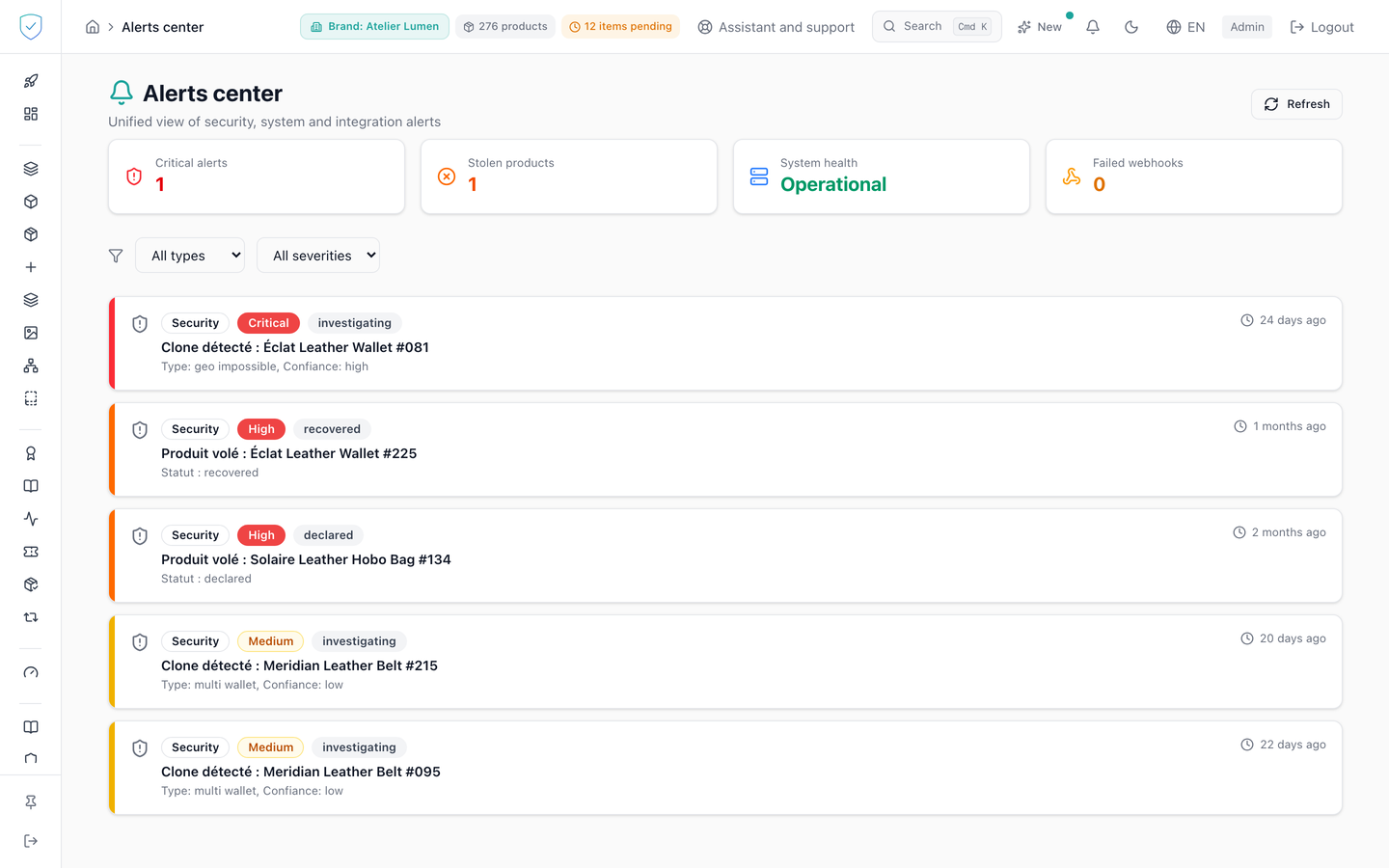
#What the screen shows
Four counters at the top: "Critical alerts", "Stolen products", "System health" and "Failed webhooks". The first adds up the critical and high clone alerts. The second adds up the plain declarations and those whose token has been frozen, freezing being an answer to theft without being its closure.
Two menus filter the feed: the type, with "All types", "Security", "System", "Webhooks", "Scan errors" and "Gray market", and the severity, with "All severities", "Critical", "High", "Medium" and "Low".
Every card in the feed carries a colour bar on its left according to severity, a family icon, a type pill, a severity pill, a title, a description and its age in plain words: "just now" under a minute, then in minutes, in hours, in days and finally in months. When the feed is empty, the page shows "No active alerts" and "All systems are operating normally".
#What you can do here
Filter by family. "Security" gathers two sources, the clone alerts and the products declared stolen. "Webhooks" only keeps the subscriptions whose delivery endpoint stopped answering. "Scan errors" keeps the NFC authentication failures, which form a family of their own and are therefore not counted in "Security". "Gray market" keeps the gray-market alerts still open, "New" or "Investigating": the title names the item and the country, the description the number of scans folded over 24 hours, the source, the confidence level ("Weak", "Probable" or "Strong") and its reason in plain words, the pill the status. Severity follows that confidence level (weak → low, probable → medium, strong → high): a "Weak" alert stays a signal to verify, not proof of grey-market distribution. The title leads to the "Gray market" tab of the Distribution screen, where the status is changed.
Filter by severity. The order retained is critical, high, medium, low, info. The feed is sorted first by severity, then, at equal severity, from the most recent to the oldest.
"Refresh" restarts the seven reads of the page.
#What conditions access
The "Alerts center" entry lives in the "Analysis & Audit" section, with no plan lock and no profile hiding, and the content waits until the account is recognized as an administrator. Each source is bounded server-side to the brands of your account.
On a brand console, the "System health" card shows "Operational". The health check is not queried from this screen, so the "System" filter stays empty there.
#What the screen refuses
The seven reads leave together and each one is isolated. The one that fails simply leaves its family absent from the feed. The error banner only appears if every read has failed.
An account with no accessible brand gets neither security statistics, nor clone alerts, nor stolen products: those three reads are refused (a 403, a refusal and not a server failure) and their families stay absent from the feed. The webhook list, for its part, comes back empty without an error.
Was this page helpful?
Your answer opens a pre-filled email in your mail app, addressed to contact@sealtrust.io. You read it over before sending it.