

Stolen products
Declare a theft, freeze the product's token on the blockchain, then release it when the object comes back.
When a product is stolen, you declare it here. Freezing its token blocks every transfer, so the object can no longer be resold with its passport. Nothing is destroyed: when the object comes back, you release the token and the case closes. Every freeze and every release ask you to retype a value absent from this page.
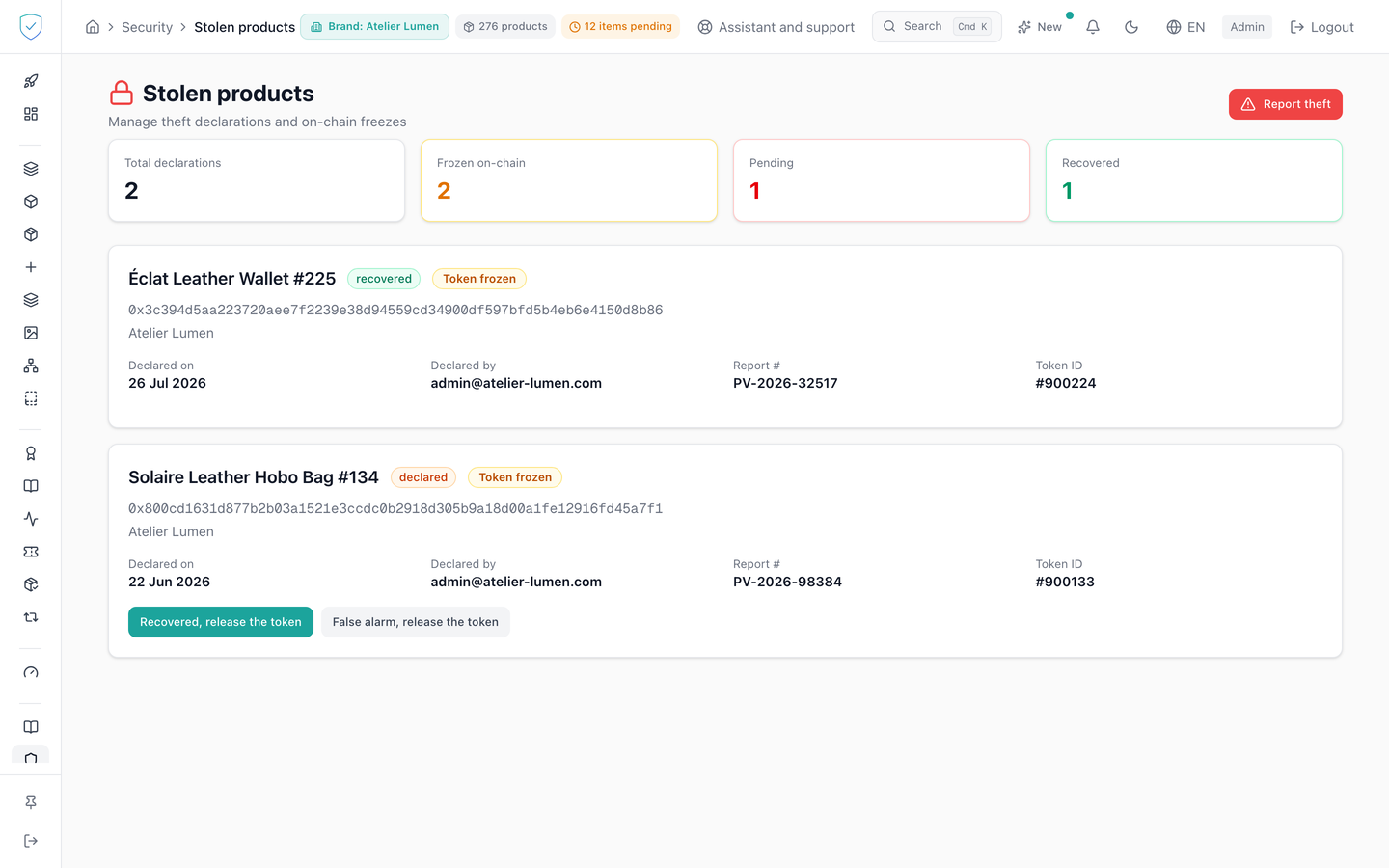
#What the screen shows
The "Stolen products" header, subtitled "Manage theft declarations and on-chain freezes", with a red "Report theft" button.
Four counters: "Total declarations", "Frozen on-chain", "Pending", "Recovered".
One card per declaration: product name, status, a "Token frozen" or "Token burned" pill where applicable, the UID in a fixed-width font, the brand, the declaration date, its author, and where applicable the police report number and the Token ID.
Clicking a card opens a detail window: brand, category, date and time, author, report number, link to the evidence, and the hash of the freeze transaction under the label "Freeze TX hash". The release hash does not appear there.
The "Declare a stolen product" window has three fields: UID Hash, which is required, evidence URL and police report number.
Two typed confirmation windows, a red one for the freeze, an amber one for the release. The release one warns that releasing the wrong unit lets a thief transfer it, and that freezing it again afterwards does not undo a transfer that has already happened.
#What you can do here
Declare a theft from the tag UID, the evidence and the report number remaining optional.
Freeze the token with "Freeze on blockchain", after retyping the product's serial number, or its token identifier when the record carries none, the window's wording saying which. The console looks that value up on the product record matching the UID.
Close the case with "Recovered, release the token" or "False alarm, release the token". The text under the buttons recalls that both release the token, and that only the wording written into the register changes.
Reopen a closed case with "Re-open this case". The status returns to declared, the token is not frozen again.
Open the supplied evidence in a new tab.
#What governs access
You must be signed in and an administrator. Otherwise the console replaces the page with "Unauthorized. Please log in at www.sealtrust.io (nouvel onglet)." and a sign-in button. No plan feature is required. This screen is not in the side menu: you reach it through the shortcut card on the security dashboard, and every action is limited to the brands you have access to.
The "Freeze on blockchain" button appears only if the status is declared and the token is not already frozen. The "Declare stolen" button stays disabled while the UID Hash field is empty.
#What the screen refuses
Without a confirmation value, the freeze and the release are refused, code CONFIRMATION_REQUIRED. With a wrong value, code CONFIRMATION_MISMATCH. Nothing is changed in either case.
If the UID matches several records carrying different serial numbers, the console sends nothing and states that it refuses to guess which one the server would act on, and that you must settle it from the product record. If no record matches, it states that there is no token to act on.
A declaration older than August 2026, when a theft burned the token instead of freezing it, offers no button at all: that token no longer exists, it can be neither frozen nor released.
An error coming from the blockchain is passed on with its original message, unmasked. An unknown or already declared product is refused with the message from the service.
An evidence address that does not start with http or https is shown as inert, non-clickable text.
With no declaration at all, the page shows a green tick and "No stolen products declared".
Was this page helpful?
Your answer opens a pre-filled email in your mail app, addressed to contact@sealtrust.io. You read it over before sending it.