

Clone detection
The list of tag cloning alerts, with their signals, their confidence and three possible verdicts.
When the same tag is scanned by several wallets, from two irreconcilable places, or with a replayed counter, the system raises an alert. This screen lists them, shows the evidence behind each one and lets you decide. Alerts are recomputed from the scans: a verdict marks the current alert as handled.
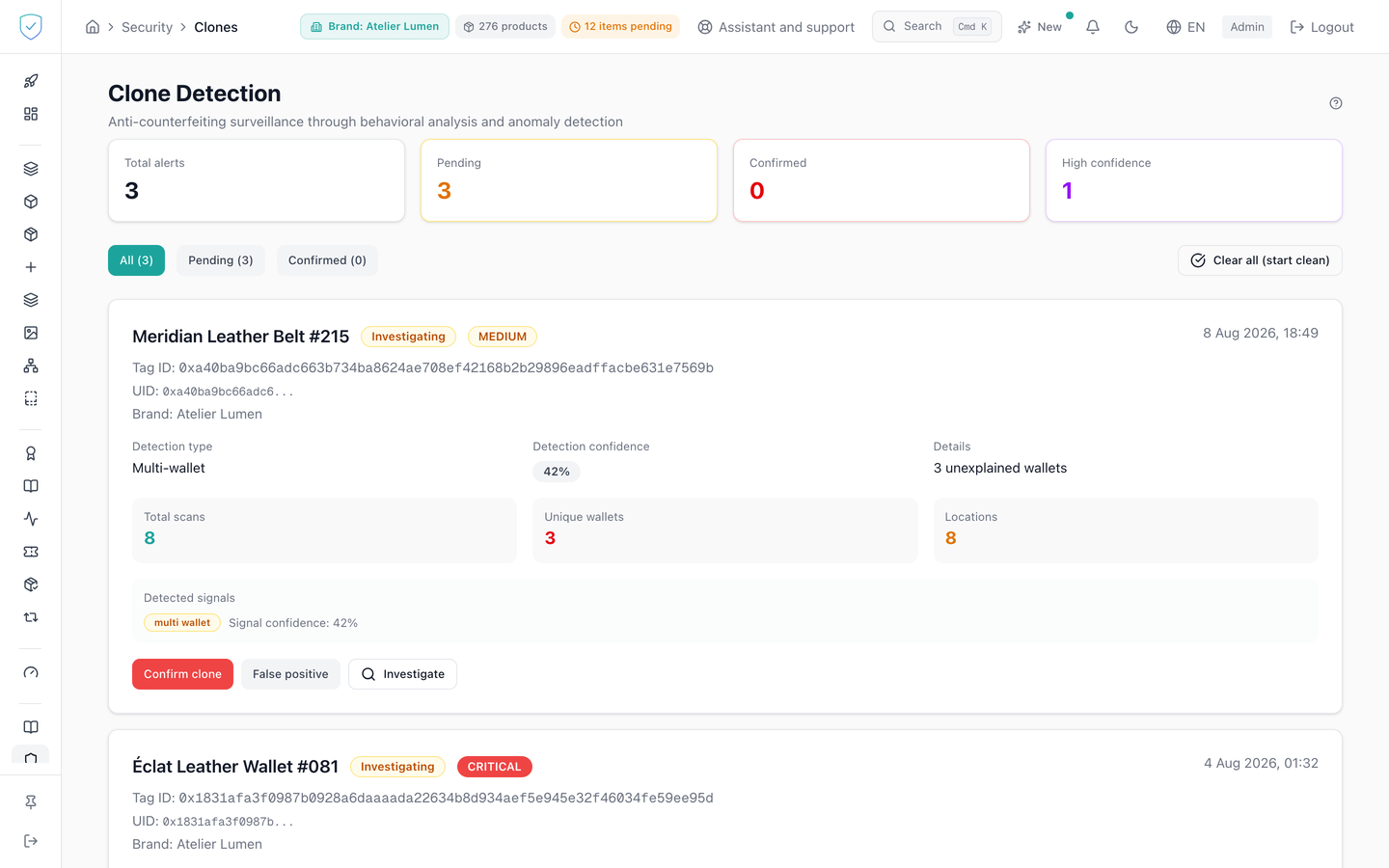
#What the screen shows
The "Clone Detection" header, subtitled "Anti-counterfeiting surveillance through behavioral analysis and anomaly detection", with a help bubble that ranks the signals from strongest to weakest and states that a behavioural signal on its own stays at medium severity, severity rising when a second independent signal confirms it.
Four counters: "Total alerts", "Pending", "Confirmed", "High confidence". The last one keeps only the alerts whose detection confidence is highest.
A filter bar, "All", "Pending", "Confirmed", each followed by its count in brackets. An "Internal tags" filter is added, only if at least one internal tag exists.
One card per alert: product name or tag identifier, status, severity in capitals, Tag ID, the first 16 characters of the UID followed by an ellipsis, never the full UID, and the brand.
On each card: the detection type, among Multi-wallet, Geo-impossibility, CTR replay and Timing anomaly, the detection confidence as a percentage, and a summary of the evidence. Depending on the case, three extra counters, "Total scans", "Unique wallets", "Locations". Then the list of detected signals, each with its confidence. The card's confidence is the strongest among its signals, and reads as a dash when the alert carries no signal.
#What you can do here
Filter on all alerts, pending ones or confirmed ones.
Show or hide internal tags, hidden by default. They are excluded from the four counters. Their tooltip states that a counter replay on an internal tag is still reported as a genuine clone.
Decide on an alert with "Confirm clone", "False positive" or "Investigate". The verdict on the alert itself is kept for 30 days.
A "False positive" goes further: it durably marks the tag's scans as legitimate, and that judgement is kept beyond the alert's thirty days. That verdict settles every one of those scans, since it states there is no copy.
"Confirm clone" labels no scan at all, by design: the alert carries every scan of the tag, including those of its legitimate owner. The response returns the number of scans left to qualify, which you designate one by one from the trust scores screen.
Clear every open alert at once with "Clear all (start clean)". A browser window asks for confirmation, and nothing is sent if you decline. The button appears only if the "Total alerts" counter is above zero.
#What governs access
You must be signed in and an administrator. Otherwise the console replaces the page with "Unauthorized. Please log in at www.sealtrust.io (nouvel onglet)." and a sign-in button. No plan feature is required.
This screen is not in the side menu: you reach it through the shortcut card on the security dashboard.
The list and the bulk clear are limited to the brands you have access to. The list can also be asked for one of those brands only: the scan map does so, for the brand picked in the top bar. Asking for a brand that is not yours is refused, never turned into an empty list.
The scans attached to an alert show neither the full IP address nor the full wallet: the IP address keeps its first two numbers (203.0.***), the wallet its first and last characters (0x1234…abcd). That is enough to see whether two scans come from the same place or the same wallet, without naming anyone. Detection itself reads the complete scans in the database and does not change.
#What the screen refuses
An alert on a tag that matches no product record in your brands cannot change status: the answer is "Access denied to this product."
An unknown status is refused. The bulk clear accepts only the resolved and false positive verdicts, and sets aside alerts that already carry one of the two. It returns the number of alerts actually changed.
A failed status update opens a browser window with "Error updating status".
Alerts marked false positive or resolved disappear from the working list, including under the "All" filter. When no alert matches the filters, the page shows a green tick, "No alerts" and "No cloning attempts detected with these filters".
Was this page helpful?
Your answer opens a pre-filled email in your mail app, addressed to contact@sealtrust.io. You read it over before sending it.