

The brand and its look
Choose the profile that decides what the console shows, put your logo and colours on the public pages, open or close the return and buyback programmes.
On this page
This is the first settings tab, the one that opens by default. It stacks 3 blocks, always in the same order: the onboarding profile choice, the logo and colour customisation, then the 2 end-of-life settings for products. You come here to change what the console shows you, or what a shopper sees when they verify a product.
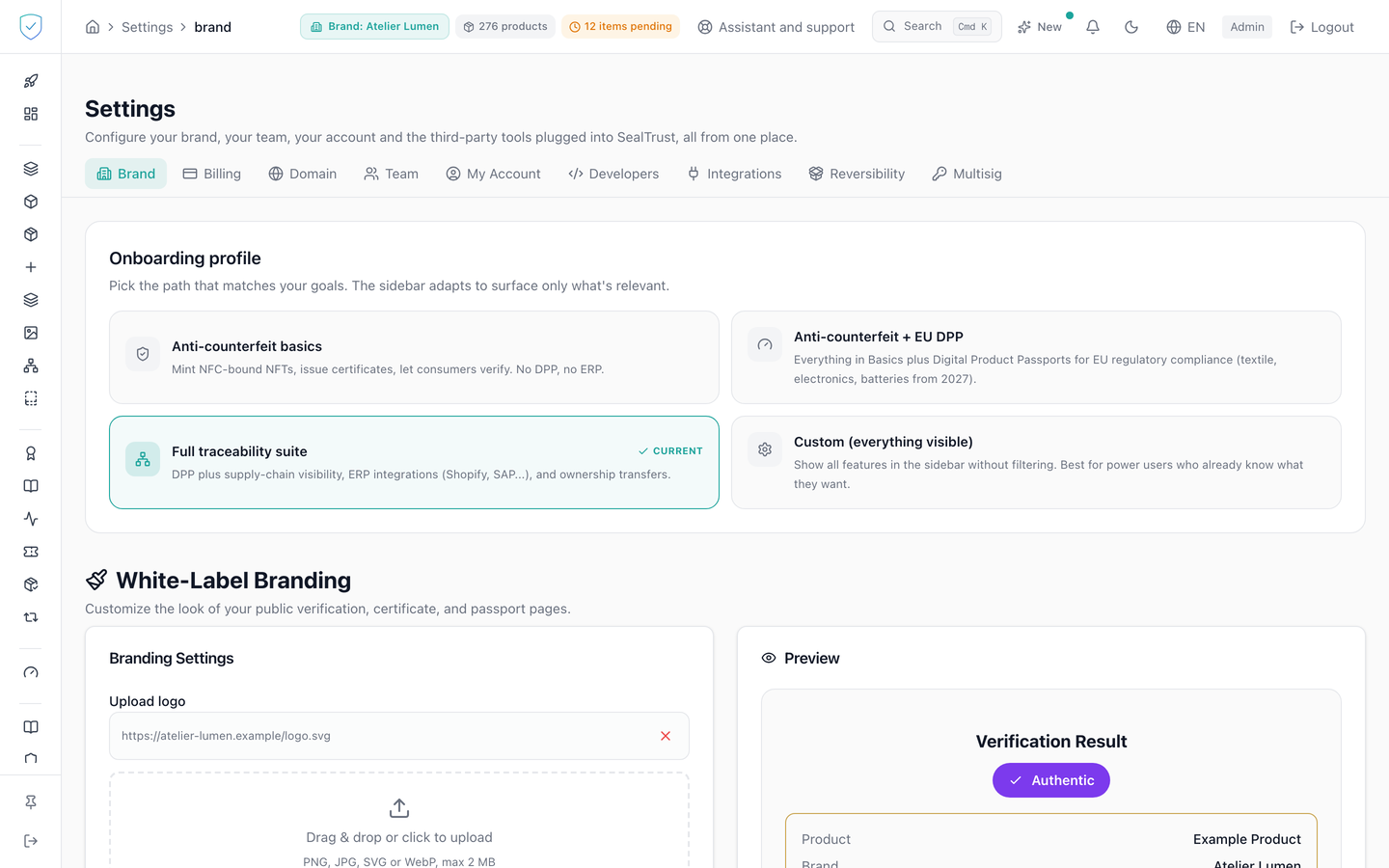
#What the screen shows
- The profile block offers 4 cards: basic anti-counterfeiting, anti-counterfeiting plus EU DPP, the full traceability suite, and a made-to-measure profile that shows everything.
- On the Compliance offer, it offers 3: "EU Digital Product Passport", "Full traceability suite" and "Custom (everything visible)". None of them speaks of tokens, NFC chips, certificates or ownership transfers, which this offer does not include.
- The customisation block holds the logo drop area, the primary colour, the secondary colour and the website address, under a line stating PNG, JPG or WebP, 2 MB maximum.
- A preview shows the result, with the wording "Powered by SealTrust" in the footer.
- Fill in who signs your declarations of conformity: the name of the authorised person and their function, then save.
- Pick your public language, or leave the option empty to go back to the site default. The setting itself is described in Settings, Domain.
#Who signs your declarations of conformity
The EU declaration of conformity ends with the name and function of the person signing it. These two lines are entered once, here, and then appear on every declaration we produce for you.
They are never published on the passport, and never written on the blockchain. So you can change or clear them at any time, for instance the day that person leaves your company.
That is why they live here rather than in the passport. Passport data is fingerprinted and anchored on the blockchain, where nothing can be removed: a natural person's name would be written there for good, and an erasure request would become impossible to honour.
The fields take what you write, with no constraint on form: a person's name and a job title do not have one.
- The last block carries 2 switches, one for returns and one for buyback. They write the
returns_enabledandbuyback_enabledfields. - If your plan includes white labeling, an extra tickbox "Show the "Powered by SealTrust" wording" appears. A brand created on a white label plan, or under a reseller's contract, finds it unticked: the wording is hidden by default. Without that plan the box is not shown: the right comes from the plan.
- A "Public language" card carries the language served on your own domain when a visitor's browser asks for none we publish.
#What you can do here
- Click a profile card. Saving is immediate, and a banner confirms the preference was recorded.
- Drop a logo image, or paste the address of an image already online. A dropped logo wider than 168 pixels or heavier than 30 KB is saved as a small WebP copy, 168 pixels wide and 30 KB at most: that copy is what every passport page loads. The original stays in the media library. A logo that is already small is kept as it is. A pasted address that names an image of your media library is saved as its small copy, like a dropped file. An address on another site is kept as it is: pick a light image then, since it is loaded on every scan.
- Pick the two colours. The fields are capped at 7 characters, the
#rrggbbshape. - Flip the return and buyback switches, then save. The button reads as saved for 3 seconds.
- Tick or untick the "Powered by SealTrust" wording, then save. Ticking shows it again, unticking hides it. The change takes effect on your public pages as soon as it is saved.
#What controls access
- The logo and colour block depends on the
custom_brandingentitlement. Thewhite_labelentitlement is a separate one and does not open it. - The server checks
custom_brandingagain before writing. - The "Powered by SealTrust" wording only disappears when two conditions are met: your plan includes white labeling, and the box is unticked.
- A brand created on a white label plan (Inside), or under a reseller's contract, is born with the box unticked: the wording is hidden by default. You can show it again at any time. A brand created before this change keeps the setting it had.
- ⚠️ Unticking it without the matching plan changes nothing: the plan grants the right, the choice is yours.
- Many brands prefer to keep it: a certificate issued and displayed entirely by you is a self-declaration, whereas a third party's attestation is what carries weight against a counterfeit.
- The card of the profile already in force is disabled.
- The customisation save button and the two switches stay disabled as long as no brand is selected.
- The two return and buyback switches are saved through the same call as the customisation. Without the
custom_brandingentitlement the server refuses to write them too, even though they stay on screen. - Customisation values are readable publicly. Changing them requires an administrator account.
- ⚠️ The public language depends on no plan: a preferred language is not something a plan grants. You can set it whatever your plan. It only has an effect where your own domain serves your pages.
#What the screen refuses
- Without the
custom_brandingentitlement, the block is replaced by a padlock and a message saying customisation is not included in your plan. - A file whose type is neither PNG, JPEG nor WebP is refused before upload, and so is a file larger than 2 MB.
- Uploading an SVG is not offered. The URL field does accept an SVG hosted elsewhere: that is a link, not an upload.
- A colour that is not a 6 digit hexadecimal value is refused: "must be a valid hex color (e.g. #1a2b3c)".
- A logo or website address that does not start with
http://orhttps://is refused. - Your primary colour is stored exactly as you pick it, but it is only applied to a button or a keyboard focus ring if it stays legible against the page background, meaning a contrast ratio of at least 3 to 1. Below that, the button keeps its default colour. A pale colour often works well in a logo and makes a button invisible; we would rather not apply it than darken it, which would show a colour you never chose under your own name.
- On your domain, a product page also puts your primary colour on the claim button and on the token number pill. The pill writes its text in your colour, so it needs a contrast ratio of at least 4.5 to 1, the threshold for text. Below that, it keeps its default colour.
- On your domain, and on your reseller's shared domain, every page of one of your products wears your colours: the product page, the passport, the certificate, the proof and the history. Your primary colour goes on the main buttons, your secondary colour on the secondary surfaces, each only if it stays legible: 3 to 1 for a button, 4.5 to 1 for the text on it. Your logo sits at the top of the product page, the passport, the certificate, the proof and the history.
- The brand of the page is read from the product shown, never from the domain name. On a reseller's shared domain, a product therefore wears the colours of its brand, not the reseller's.
- If your visitor chose the dark display, each colour is checked again against the dark background. A dark colour, legible on a light background, is not applied there: the page then keeps our colours in that display only.
- The colour that says "verified" stays ours on every page. It carries a meaning, and that meaning must not change from one brand to the next.
- On our own domain, the pages keep the look they had.
- Aiming at a brand other than your own is refused, with an access denied message for that brand.
- If reading the return and buyback settings fails, both switches fall back to the closed position.
Was this page helpful?
Your answer opens a pre-filled email in your mail app, addressed to contact@sealtrust.io. You read it over before sending it.