

The DPP compliance score
A score out of 100 per product model, its breakdown by dimension, its regulatory deadlines, the PDF evidence export and the European registry connector.
The screen scores each product model from 0 to 100 on its readiness for the European digital product passport, and states what is missing. You first see the brand average and the list of models, then open a model for its detailed sheet.
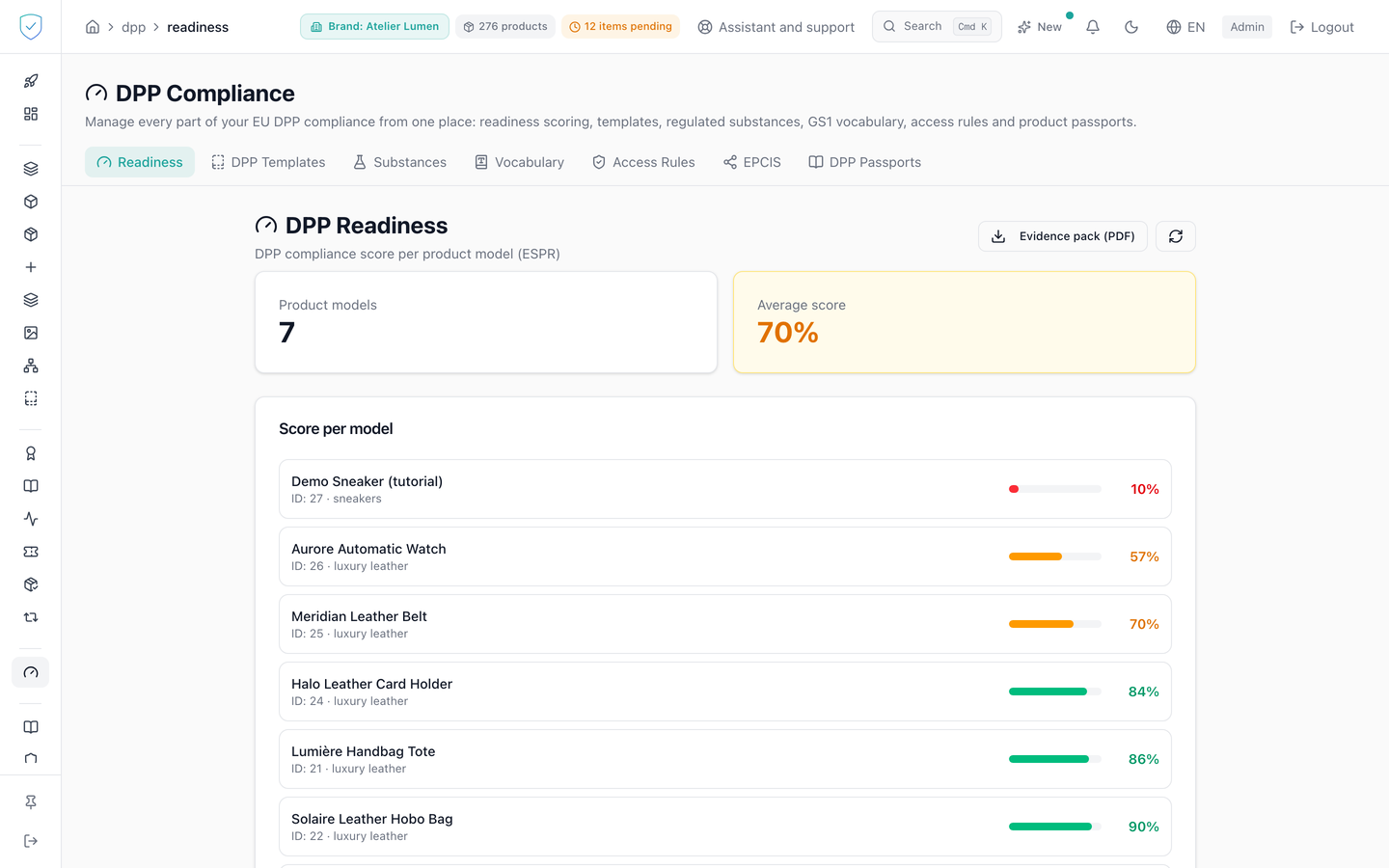
#What the screen shows
In list view: two tiles for product models and average score, then the score by model card. The brand being looked at is chosen in the top bar, not on this page: the selector that used to sit here was removed, because two selectors could disagree and show one brand's score under another brand's name. That single choice drives the list, the average and the brand-level export, which therefore only ever cover the selected brand. When the account holds a single brand, the top bar shows its name with nothing to choose. Each model is a clickable row: its name, its identifier, the playbook name where there is one (the name your brand gave its template, not a technical key such as "custom 2"), a progress bar and the score as a percentage. The ordering runs from the lowest score to the highest, and the colour code is fixed: green from 80, amber from 50, red below. Below that card, the EU DPP Registry connector card repeats the same badges and the same sentence as the registry card in detail view; it only appears when the connector state could be read.
In detail view:
- The overall score in large type, a playbook selector, the history as a curve, and one bar per dimension: product identity, materials, suppliers, lifecycle, compliance, substances, publication and proof.
- Unit level evidence: the number of units and four percentages, published passport, verifiable credential (VC), hash, IPFS anchoring.
- The playbook checklist, a green tick or an amber exclamation mark per item, and its type: component, event or passport field.
- The regulatory deadlines, an in force, expected or watch badge, and the number of days left. That number counts calendar days, on the reader's own calendar: a deadline set for tomorrow reads 1 all day long, until midnight where the reader is and not midnight in London. A deadline reached or gone shows no countdown at all.
- The European DPP registry card: connector state, identifier field, detail of the record.
- Missing items and recommendations, replaced by a green box when both are empty.
#What you can do here
- Open a model to read its sheet, and refresh the list.
- Pick a vertical playbook or leave automatic detection, then save. The button stays disabled while the chosen value is the one already in place. The choice is stored on the product model.
- Automatic detection starts from the model's CATEGORY, and from its family: leather goods, fashion and watchmaking go to their own scale, electrical, plumbing, heating, building and industry to the construction products regulation, electronics to the EEE scale, beauty to the voluntary "Beauty and perfume" template, which scores the label mentions of Article 19 of Regulation (EC) No 1223/2009. A few categories have a scale of their own, more precise than their family's, such as sneakers and shoes. A model with no category falls back on keywords read in its name and description, and failing that on fashion: a categorised model, however, never goes through that path again. Three families are deliberately left unmapped, for want of a scale that suits them: home, sports and leisure, and "other". A model with no category whose name or description mentions perfume, eau de toilette or cosmetics goes to the beauty template, before any other keyword: a perfume with "leather notes" is no longer scored as leather goods. Words are read whole, and a candle never goes there: a "scented candle" ("bougie parfumée") or a perfumed sachet is not a cosmetic.
- Click recompute now: the score is recalculated. A history point is recorded only if the score changed since the last point; otherwise the message says nothing was added. Through the API, the response carries two dates:
computed_at, when the calculation ran, andscore_since, the date since which that score has held. A drop of more than 5 points since the last point raises an alert. The same calculation runs every night for all models. - Reading the curve: each point marks a change of score, and the score stays the same until the next point. The curve is therefore drawn in steps and carried up to today. The horizontal axis follows the calendar: a step held for a year is far wider than a step held for a day. The history API returns 90 points by default, 365 at most.
- How long history is kept: the last year is kept point by point. Beyond that, one point per month remains, the last score of the month. The latest point of a model is never deleted, however old, because the drop alert compares against it.
- Switch brand from the top bar, when the account holds several. The list, the average and the brand-level export follow.
- Download the evidence pack as PDF, at brand level from the list or at model level from its sheet. The brand-level export only covers the selected brand.
- Enter a unit serial number, ask for a preview of its record in the European registry, then trigger the send. The button reads "Register" when the connector is active and "Dry-run" otherwise. Opening another model resets that panel.
Every evidence pack downloaded, at brand or model level, leaves one line in the audit log: the account, the date, the IP address and the brand or brands covered. The API route that prepares the bulk registration files for the European registry, POST /admin/dpp-registry/batch-export, which this screen does not offer, leaves one too. This trace never blocks the export.
#What governs access
The tab sits behind the DPP workspace profile guard, which excludes the basic brand profile. The PDF evidence export and the registry connector both depend on the dpp plan option, checked brand by brand, including on the brand level export.
Actually sending to the registry depends on two server settings: without them, the call stays a preview. The registry card says the registry has been live since 20 July 2026. That date is behind us, and it is written that way: the badge reads "Live since", not "Go-live". A milestone still ahead would keep the other wording, and the label follows the date, never the other way round.
That card carries no other deadline. Dates that depend on a product group, such as the battery passport, stay in the regulatory deadlines card, with the regulation that imposes them, the products they cover and the days left. A date shown without the fact that makes it true promises a leather goods maison an obligation that does not concern it.
Under the badges, a sentence recalls that the registry records the passport address and its GS1 identifier, not the data itself, and that only a verified economic operator may register a passport there: enrolment is sealed by that operator's own legal representative, so the brand enrols itself and we cannot do it in its place. In the detail view card, that sentence stays on screen even when the connector state could not be read; only the badges go, since nothing is then known about the state. The list view card, for its part, disappears entirely in that case. The preview and send buttons stay disabled while the identifier field is empty.
#What the screen refuses
- Beyond 2000 models in the catalogue, the aggregate summary is refused: the message invites you to filter by brand or to look model by model.
- A model outside the brand scope: "Product model not found".
- A unit with no public serial number, or a platform whose application URL is not configured, is refused. The GTIN itself stays optional.
- Registering a unit or a batch of another brand: 404, the same answer as an unknown identifier.
- On failure: the evidence pack could not be generated, the playbook could not be saved, or the score could not be recalculated.
Was this page helpful?
Your answer opens a pre-filled email in your mail app, addressed to contact@sealtrust.io. You read it over before sending it.