

The media library
The brand's file library: images, videos, documents and 3D models, attachable to a product or to a model.
This is where the files the brand publishes around its products are kept. You upload several files at once, attach them to a unit or to a model, and get a viewing link. Deletion is protected: when a file is cited by metadata already published on chain, the server refuses it and invites you to replace the file at the same key.
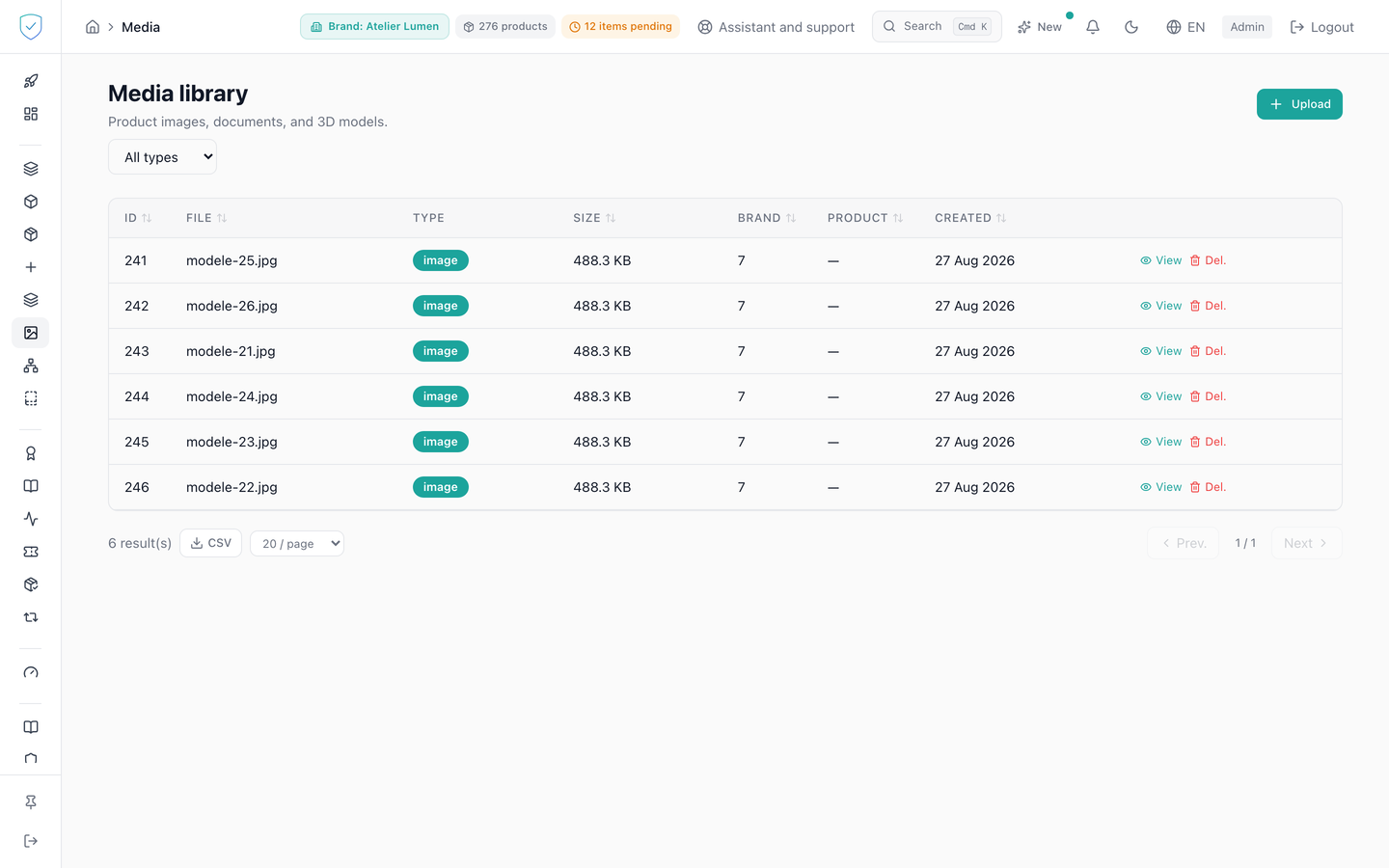
#What the screen shows
A table of 20 rows per page: ID, File, Type, Size, Brand, Product and Created. Each row carries a type badge, in a different color for image, video, document or 3D model, and the file size written in bytes, in kilobytes or in megabytes. Two actions per row: "View" and "Delete".
An "All types" filter opens on Image, Video, Document and 3D model. The upload form is folded behind an Upload button. When the library is empty, the screen shows "No media" and the "Upload a file" button.
#What you can do here
Select several files at once and upload them. They go out one by one, one after the other. A failure on one file does not cancel the others, and each failure is written with the name of the file concerned.
On upload, you choose the brand, the asset type, a product to link, a model to link and an alternative text. The list itself is filtered by asset type.
"View" asks the server for a fresh signed link and opens the file in a new tab. "Delete" removes the file once its exact name is retyped, and the dialog first announces what the file will lose. The stored object is only removed after the record is deleted, and only if no other record points to the same key.
#What conditions access
The screen only shows for a signed-in administrator account, and the list follows the brand chosen in the top bar, not every brand the account has access to. The upload button stays inactive as long as no brand is chosen, and the lists of products and models to link only fill in after that choice, each one limited to that brand.
The accepted file types are JPEG, PNG, WebP, GIF, MP4, PDF, GLB and glTF, eight in all. The maximum size of a file is 10 megabytes. A PNG, JPEG or WebP image wider than 168 pixels or heavier than 30 KB also gets, at upload, a small WebP copy stored next to the original, for the logo of the public pages. Every PNG, JPEG or WebP image also gets a light copy for the product photo: WebP, 800 pixels at most on the long side, 100 KB at most, no EXIF data (the GPS position of a phone photo does not go out). The public pages load these copies; the original stays in the media library, untouched. An image that cannot be read safely (outsized dimensions, unexpected format) gets no copy: the public page then shows the original. Deleting an image also deletes its light copy. The list returns 20 items by default and 100 at most.
#What the screen refuses
- A content type outside the list: 400, "Content type '...' not allowed. Allowed: ...".
- A file whose content does not match the declared type: 400, "File content does not match declared content type". The server reads the file's content, not its name: the start-of-file signature for JPEG, PNG, GIF, PDF and GLB; "RIFF" followed by "WEBP" for WebP; the "ftyp" box at the head of the file for MP4; valid JSON that announces its glTF version (
asset.version) for glTF. A file saved normally by a piece of software goes through. A file of another format that was merely renamed is refused, and nothing is stored. - A file that is too heavy: 413, "File too large (... bytes). Max: ...". The server stops reading as soon as the ceiling is passed: a file that is too heavy is refused before its content is examined.
- A product or a model from another brand as the target of the link: 400, "Target product does not belong to the asset's brand" or "Target product model does not belong to the asset's brand".
- A deletion whose retyped file name does not match: 400, and the screen states that the deletion was refused and that nothing was changed.
- The deletion of a file cited by ERC-721 metadata already published: 409. The message names the units concerned and invites you to replace the file at the same key.
This refusal only looks at the files that could be cited. A file uploaded after a unit was minted cannot appear in metadata frozen before it: it is therefore not counted as cited, and its deletion goes through.
The date used is the moment of the mint, not the moment the product record was created: the direct creation form writes the record without minting, sometimes several days earlier. And when that moment cannot be found, the server concludes nothing and keeps its refusal. A doubt costs you one round trip, never a destroyed image.
When one file of a multiple selection is rejected, the others are kept and the detail of each failure is displayed.
Was this page helpful?
Your answer opens a pre-filled email in your mail app, addressed to contact@sealtrust.io. You read it over before sending it.